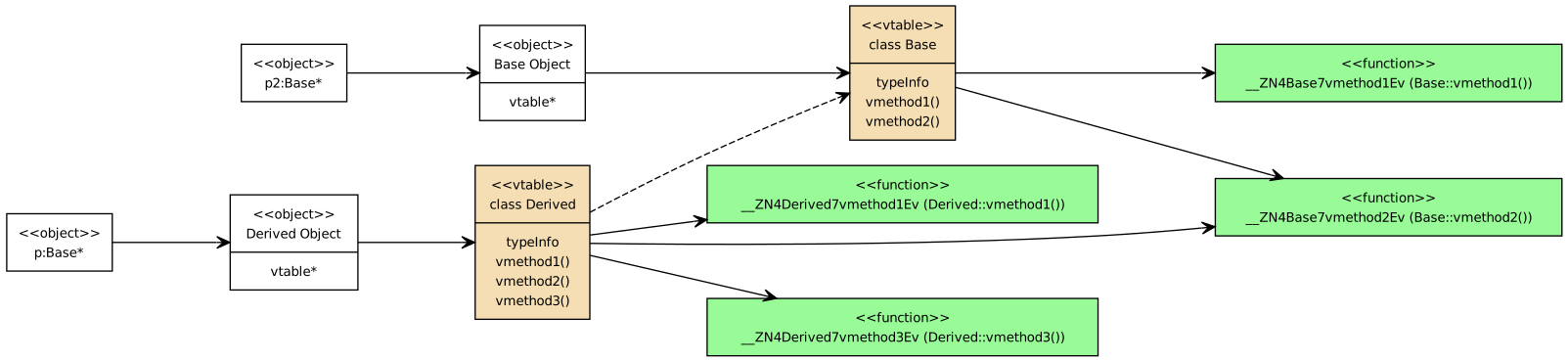
There is no standard diagram to show a vtable. These are my own created using dot notation with GraphViz. GraphViz is for general graph visualization. You can create UML diagrams in GraphViz, but you have to do much more work yourself, unlike yuml. Many of the more complex UML Class Diagrams in the notes, especially for design patterns, use GraphViz as it provides more control over the arrangements of the nodes (classes). The vtable diagrams in the notes were originally done as modified UML Class Diagrams in yuml, e.g., VTable Base Pointer but I converted them to GraphViz.
In this exercise, you will complete a VTable diagram with a new class, Rectangle, which inherits from the class Shape.
The diagram already has all classes and all method definitions. You just have to complete the vtable so that the method pointers in the vtable point to the correct function.
The easiest way to work with the diagram is with GraphVizOnline. Start with the base diagram, and add the dot notation for the vtable method pointers to the correct methods. You can use the [Shape and Circle VTable Diagram] for an idea of how to get the edges from the Rectangle vtable to the functions.
To get credit, all edges must be correct. And it must load without errors at GraphVizOnline. Do not save any changes until you verify that it displays a diagram at GraphVizOnline without any errors
You can also convert the VTableRectangle.dot file using the command-line tool, dot
The dot program is available on macOS and WSL/Linux with the package graphviz. I also added it to the GitHub Codespaces image.
Note that dot is part of a number of graph-drawing algorithms (see man dot). This one uses fdp to control the placement of the nodes.
Due by 4 pm on Fri, Apr 10.