Archive
-
Finals Week Posted: May 04
- Final Exam Thursday, May 7, 2:30 - 4:30 pm
- Finals Week Office Hours
- XMLFramework Project Due by 11:59:59 pm on Friday, May 8.
-
Project 4 Scores and feedback posted in Brightspace and GitHub Issues.
There is no requirement to fix or close Project 4 issues.
-
Course Evaluation Bonus
To determine if the cutoff was reached, I will take the number of evaluations out of the number of students in each section who take the Final Exam.
-
Week 16 Class 27 Thu Apr 30 Posted: Apr 30
After Class
- Notes PDF forms of all notes are posted on the Notes page. See the [PDF] links.
Announcements
- Tuesday's Class Due Dates The due dates for the exercises on Tuesday stated Mon, May 4. This was a mistake, as Brightspace due dates showed. I will honor the Monday date and accept them by Monday.
- Project 4
- Final Exam Thursday, May 7, 2:30 - 4:30 pm
- XMLFramework Project
-
Course Evaluations
- Open until Sunday May 3
- I can view the number of completed evaluations
- Individual responses and who filled out the evaluation is anonymous
- I do not see the overall scores and comments until after I submit the course grades
Bonus: I will drop another lowest Exercise score if a high percentage of your section fills out the course evaluation.
Agenda
-
Creating a shared and static library with the gnu compiler (gcc)
- Exercise 103: Libraries Crossword
-
Exercise 104: Libraries Session
This exercise is optional as I will drop another lowest Exercise score.
In an asciinema terminal session, perform the following on the Increment example. You can do so in Linux or in macOS.
All commands must be typed in (not copy and pasted). Be sure to remember to use tab completion for filenames.
- Notes: Design Pattern Message Queue
- Exercise 105: Design Pattern Message Queue Crossword
- Notes: Conclusion
- Exercise 106: Conclusion Crossword
Unless otherwise noted, exercises are due by 4 pm on Fri May 01
-
Week 16 Class 26 Tue Apr 28 Posted: Apr 28
Announcements
- Final Exam Thursday, May 7, 2:30 - 4:30 pm
- Guide: PDFs of Online Slides
- XMLFramework Project
- Guide: Redirecting stdin
-
Course Evaluations
- Open until Sunday May 3
- I can view the number of completed evaluations
- Individual responses and who filled out the evaluation is anonymous
- I do not see the overall scores and comments until after I submit the course grades
Agenda
-
Add operations to classes without changing them
OutputList Example from the notes
Git Commands Git branch commands
GitHub Classroom invitation link in Brightspace if you want to run this in GitHub Codespaces.
- Exercise 100: Design Pattern Visitor Crossword
-
Pipe & Filter Example:
- Notes: Design Pattern Proxy
- Exercise 102: Design Pattern Proxy Crossword
-
Creating a shared and static library with the gnu compiler (gcc)
Unless otherwise noted, exercises are due by 4 pm on Mon May 04
-
Final Exam Posted: Apr 28
The Final Exam is in our regular classroom Final Exam: Thursday, May 7, 2:30 - 4:30 pm.
You are responsible for the following:
- lambda functions - Be able to write code with capture and parameters
- UML - Multiplicity and the five relationships: generalization (inheritance), dependency, association, composition, and aggregation. Be able to list and briefly explain the relationships, including an UML Class Diagram. Know the proper arrows for each relationship.
- Extension points - Four implementations: A) Callbacks using lambda functions, B) Direct inheritance from a Base class, C) Inheritance from a Handler used by a Base class, D) C++ Templates. Be able to compare at least two of these approaches on a small code example, including a small UML Class Diagram (except for D).
- RAII - What it means, why it is important, how to implement
- SOLID - Know the list of principles, both abbreviations and full names
- Coupling - Definition, list of types of coupling, why decoupling is important
- API - Definition
- PIMPL - General concepts
- Dispatch - Static vs. Dynamic, Given code and output, change code to generate the proper output
- Libraries - Difference between static libraries and shared libraries (dynamic libraries)
- Extra: vtable and how it works
The exam includes various types of problems, such as short answers, definitions, comparisons, diagram drawing, and coding.
The questions are based on what I covered in class, including the book, the exercises, and the projects. If I did not cover it in class, it is not on the exam.
The following exam answers are taken from your work on the XMLFramework Project. You will not answer them on the Final Exam
- UML multiplicity, generalization (inheritance), composition, and aggregation. Know the syntax of the diagrams for each. Given code, state the relationship, and draw a UML diagram.
- Design Patterns - general concepts, specific patterns: Template Method, Factory Method, Composite, Command, Adapter, Facade, Singleton.
- exception handling Given exception handling code, show the result. Add exception handling to a code example.
- Software Architecture - Given a problem, compare and contrast solutions using these two architectures.
- C++ Inheritance specifiers: override and final
- C++ Constructor Specifiers: explicit, mutable, default, delete
-
Week 15 Class 25 Thu Apr 23 Posted: Apr 23
Announcements
-
GitHub Classroom invitation link in Brightspace.
-
Course Evaluations
- Open until Sunday May 3
- I can view the number of completed evaluations
- Individual responses and who filled out the evaluation is anonymous
- I do not see the overall scores and comments until after I submit the course grades
Agenda
- Exercise 95: XMLFramework Quiz
- Exercise 96: Complete at least one
@TODOin the XMLFramework Project. -
Provide a unified interface to a set of interfaces in a subsystem
Facade defines a higher-level interface that makes the subsystem easier to use
- Exercise 97: Design Pattern Facade Crossword
-
Notes: Design Pattern Singleton
Ensure a class only has one instance and provide a global point of access to it
- Exercise 98: Design Pattern Singleton Crossword
-
View instantiated templates with clang:
View instantiated templates online: cppinsights.io
- Exercise 99: C++ Templates Crossword
-
Add operations to classes without changing them
OutputTree Example from the notes
Git Commands Git branch commands
GitHub Classroom invitation link in Brightspace if you want to run this in GitHub Codespaces.
Unless otherwise noted, exercises are due by 4 pm on Mon, Apr 27
-
-
XMLFramework Project Posted: Apr 23
The project is critical to your overall grade in the course, and parts of it count toward 25% of the questions on the Final Exam. Consider this the take-home part of the Final Exam. No matter how you performed on the previous projects, you need to work on this project.
The project is due by 11:59:59 pm on Friday, May 8. The project consists of the following:
- Parsing XML with a variety of push and pull parsers
- XPath evaluation - XPath is an addressing language for XML
- XSLT transformation - XSLT is a transformation language for XML
- Combining these operations as needed by the applications
The open-layered architecture framework, XMLFramework, supports all of this and includes:
- Apps
- Applications using the XMLFramework
- xmlpipeline.cpp - CLI for using the framework
- XMLFramework
- As described above
- XMLToolkit
- Set of C++ classes for processing XML
- Used to implement XMLFramework, but can be used directly
- Where your XMLParser lives (if you add it)
- XMLLibrary
- Set of C functions for processing XML
- Used to implement the XMLToolkit, but can be used directly
There is already a lot of code in the project. The primary task is to finish the remaining @TODOs. Some examples are:
All
@TODOs are worth the same. You are required to implement all but 6 of the@TODOs. Any more@TODOs after that count as extra credit. As a result, you are not required to integrate your XMLParser into the framework.The work involved is:
- (50%) Complete any
@TODOs. Each completion of a@TODOmust be in a separate commit. - (20%) Fill in all classes
@patternand@rolecomments. A class can participate in multiple roles in multiple patterns. - (10%) Document the use of design patterns in the markdown file DESIGN.md. Each instance of a design pattern in XMLFramework must be listed, including the collaborators.
- (10%) Document the architectures used in the XMLFramework in the markdown file ARCHITECTURE.md
- (10%) Draw a UML diagram of the entire project in the file UML.pdf
Notes:
- The GitHub Classroom invitation link is on Brightspace.
- The answers to some questions on the Final Exam are from your work on this project. For example, instead of creating a UML diagram during the Final Exam, your UML diagram from this project is your Final Exam answer. You must do these parts as they also count toward the Final Exam.
- The project has a complete CMake build. You can add files to the subdirectories, and the CMake build will handle them automatically. Each file in the apps directory is assumed to be a single executable. If you add files, make sure you also commit and push them to GitHub. Always verify on GitHub that the correct files are there.
- In XMLFramework, the app, xmlpipeline, uses CLI11 for parsing command-line options. When you run cmake, the file is downloaded.
- To quickly find code,
git grepworks well. For all the lines of code that contain@TODO, enter the commandgit grep "@TODO"in the project's top directory. To see only the filenames,git grep -l "@TODO". The command depends on the directory where you run it; e.g., if you run it in the framework directory, the results are from that directory and its subdirectories. To view an overall report of which@TODOs are left, use the build target:make todoentered in the build directory.
-
Week 15 Class 24 Tue Apr 21 Posted: Apr 21
Announcements
Agenda
- Notes: C++ Constructor Specifiers
- Exercise 91: C++ Constructor Specifiers Crossword
-
Notes: Design Pattern Composite
Compose objects into tree structures to represent part-whole hierarchies
Composite lets clients treat individual objects and compositions of objects uniformly
- Exercise 92: Design Pattern Composite Crossword
-
Convert the interface of a class into another interface clients expect
Adapter lets classes work together with incompatible interfaces
- Exercise 93: Design Pattern Adapter Crossword
- Notes: PIMPL
- Exercise 94: PIMPL Crossword
-
Provide a unified interface to a set of interfaces in a subsystem
Facade defines a higher-level interface that makes the subsystem easier to use
Unless otherwise noted, exercises are due by 4 pm on Wed Apr 22
-
Week 14 Class 23 Thu Apr 16 Posted: Apr 16
After Class
-
Project 4 I added back the manual instructions to change from
templatetohandler. You can do that as an alternative to the pull request. If you did pull the requesthandlerbefore you were done with template, then let me know and I can manually fix it.If you have any issues or questions on converting from template to handler for the file setup, let me know.
-
Guide: Contiguous Container Allocation I renamed this to clarify that reallocation is for contiguous containers. I also added links to the code where the new size is calculated.
Announcements
- Project 4
- Project 3 I posted the feedback on the diagrams. I also posted scores for all the separate parts: v3a 40%, v3xmlstats 25%, v3identity 25%, Class Diagram 10%, and Sequence Diagram 10%. I took your total points of these out of 100.
-
Exercise 81: Software Development Habits Survey This is an optional exercise that involves taking an outside survey. The survey involves making changes to code in a browser-based editor. See the Brightspace anouncement for more information, and how to get a screenshot to prove your survey completion.
Upload the screenshot to Brightspace. Due by Noon on Fri, Apr 17.
- Exercise 82: Encoder Reminder that both parts, the changes in the commits and the asciinema session, were required.
- Exercise 85: Design Pattern Factory Method Quiz Scores are posted and correct answers released.
Agenda
-
Benchmark: reserve() before processing
- Write without the optimization
- Verify it works (with an automated testsuite if possible)
- Perform the optimization
- Measure and check that the optimization is an improvement
- Guide: Contiguous Container Allocation
- Exercise 86: Container Allocation Completed on paper in class
- Notes: SOLID
- Exercise 87: SOLID Crossword
- Notes: Design Pattern Command
- Exercise 88: Design Pattern Command Crossword
- Exercise 89: C++ Inheritance Specifiers Crossword
-
Notes: Design Pattern Strategy
Define a family of algorithms, encapsulate each one, and make them interchangeable
Strategy lets the algorithm vary independently from clients that use it
- Exercise 90: Design Pattern Strategy Crossword
- Notes: C++ Constructor Specifiers
Unless otherwise noted, exercises are due by 4 pm on Mon, Apr 20
-
-
Week 14 Class 22 Tue Apr 14 Posted: Apr 14
Announcements
- Project 4
-
Exercise 73: Dynamic Dispatch
Feedback is in the file oracle.dynamic.txt in the branch feedback in your repository. This is the difference between the oracle (with the correct answers) and your Base.cpp. If it is empty, then that means your answer is completely correct (reflected in your score). Even if your answer is correct, the file may show some differences.
There is a strong possibility that this will be in a question on the Final Exam.
-
Exercise 76: FileIO
Please read over the feedback in Brightspace. Even if you got a 10 points, there may be feedback as to your comments or coding style.
- All methods should have a comment before the declaration/definition. This includes constructors and destructors. See the notes for a good comment before a destructor.
-
Do not use the term
// virtual ...for a comment of a method (or destructor). The keywordvirtualtells us that. The following are examples of substandard comments for destructors:
-
Exercise 81: Software Development Habits Survey This is an optional exercise that involves taking an outside survey. The survey involves making changes to code in a browser-based editor. See the Brightspace anouncement for more information, and how to get a screenshot to prove your survey completion.
Upload the screenshot to Brightspace. Due by Noon on Fri, Apr 17.
-
Examples and Coding Style
We started looking at code that involves multiple classes. To more clearly show the relationships between classes, e.g., two classes involved in a design pattern or classes that inherit from one another, we will often include the definitions of constructors, methods, and destructors directly in the class, rather than in a separate declaration file (i.e., .hpp) and a definition file (i.e., .cpp). However, for any code in a project, you must still follow our established rules:
- Each class in its own file
- Constructor, method, and destructor declarations in a declaration file, e.g., .hpp
- Constructor, method, and destructor definitions in an implementation file, e.g., .cpp
Failure to follow this will result in a penalty, except in very specific approved cases.
Agenda
-
Use the GitHub Classroom Exceptions invitation link in Brightspace.
Take the code and perform the following changes, each in a separate commit:
- Change the maximum size from 4096 to 2048 in both the code and the exception message
- Change the byte-alignment requirement from 8 to 16 in both the code and the exception message
- Change the minimum block size from 8 to 4 (size 3 and smaller still throws an exception)
Run the program once without an exception being thrown. Then, run the program once for each exception, and show that the exception is thrown. Note that there are instructions for building, BUILD.md. You can also install the program
encoder(see INSTALL.md). Once installed, you can runencoderfrom any directory. Note that if you rebuild, you will need to reinstall. See README.md for how to run.To demonstrate this, record a terminal session using asciinema. Submit the terminal session using the form in the exercise title. You can use GitHub Codespaces for this as it has
asciinemainstalled.Note that both parts, the commits and the asciinema session, must be completed to receive any points.
- Notes: API
- Exercise 83: API Crossword
- Notes: Design Pattern Factory Method
-
Exercise 85: Design Pattern Factory Method Quiz
Complete the quiz. Any incorrect answer is a point off out of 10, so answer very carefully.
You will see the correct responses after the due date.
- Notes: SOLID
Unless otherwise noted, exercises are due by 4 pm on Wed Apr 15
-
Week 13 Class 21 Thu Apr 09 Posted: Apr 09
After Class
- Project 4 Do not pull the pull request for handler until you are completely done with template.
-
Exercise 81: Software Development Habits Survey This is an optional exercise that involves taking an outside survey. The survey involves making changes to code in a browser-based editor. See the Brightspace anouncement for more information, and how to get a screenshot to prove your survey completion.
Upload the screenshot to Brightspace. Due by Noon on Fri, Apr 17.
Note The survey has you making edits to code. Not making edits to code leads to zero credit for taking the survey.
Announcements
-
CPSC 480 Software Engineering (SE)
I also teach the required core course, CPSC 480 Software Engineering. The course is offered once a year, so it is offered in Fall 2026, and will not be offered in Spring 2027.
- Project 4 The additional file, file renames, and build changes for the tag handler are now in a pull request. Contact me if there are any issues.
- Exercise 75: VTable Diagram Due by 4 pm on Fri, Apr 10
- Exercise 76: FileIO I posted the invitation link in Brightspace. Due by 4 pm on Fri, Apr 10
Agenda
- Exercise 77: rValue References Crossword
- Notes: Handlers
- Exercise 78: Handlers Crossword
-
Notes: Errors and Exception Handling
RAIIDataMembers Situation that shows why you should always use RAII types for your data members, and not try to do the memory management outside of that.
- Exercise 79: Errors and Exception Handling Crossword
- Exercise 80:
std::exceptionHierarchy Crossword
Unless otherwise noted, exercises are due by 4 pm on Mon, Apr 13
-
Week 13 Class 20 Tue Apr 07 Posted: Apr 07
After Class
- Exercise 76: FileIO Posted the invitation link in Brightspace
- Project 4 The additional file, file renames, and build changes for the tag handler are now in a pull request. Contact me if there are any issues.
Announcements
- Project 3 I uploaded all issues for Project 3. No scores yet, and no feedback on the diagrams yet.
-
Exercise 71: Static Dispatch
Feedback is in the file oracle.txt in the branch feedback in your repository. The file oracle.txt is the difference between the oracle (with the correct answers) and your Base.cpp. If the oracle.txt is empty, then that means your answer is correct (reflected in your score). Even if your answer is correct the oracle.txt may show some differences. The differences were manually examined and I used more direct techniques to determine if there were any dynamic dispatch in your answer.
There is a strong possibility that this will be in a question on the Final Exam.
- Exercise 64: Names Score in Brightspace. Feedback in Report.md in the branch feedback. There is a strong possibility that this will be in a question on the Final Exam.
Agenda
-
Exercise 72: Names II
Using the feedback in the Report.md, fix your Names code.
If you have no changes to make (based on the feedback), leave the code alone.
-
Exercise 73: Dynamic Dispatch
The repository Base has a set of various method call situations, and a way at run time (using
assert()) to verify which method is actually called.- If the call is performed using dynamic dispatch then complete the
assert()in the code that indicates (via a string) which method is called, e.g., form2()is it"Base::m2()","Derived::m2()", or"DerivedDerived::m2()"? - If the call is performed using static dispatch then comment out the
assert(), e.g.,
Handle each assertion one at a time in order, compiling and running the program (i.e.,
make run) after each assertion is completed. The assertion you edited should pass, and you should be onto the next assertion.You are required to commit for each block of statements in the main program.
- If the call is performed using dynamic dispatch then complete the
- Notes: Design Pattern Template Method
- Exercise 74: Design Pattern Template Method Crossword
- Project 4
- Exercise 75: VTable Diagram Due by 4 pm on Fri, Apr 10
- Notes: Virtual Destructors
- Exercise 76: FileIO Due by 4 pm on Fri, Apr 10
- Demo: Too many open files
- Notes: rValue References
Unless otherwise noted, exercises are due by 4 pm on Wed Apr 08
-
Exercise 75: VTable Diagram Posted: Apr 07
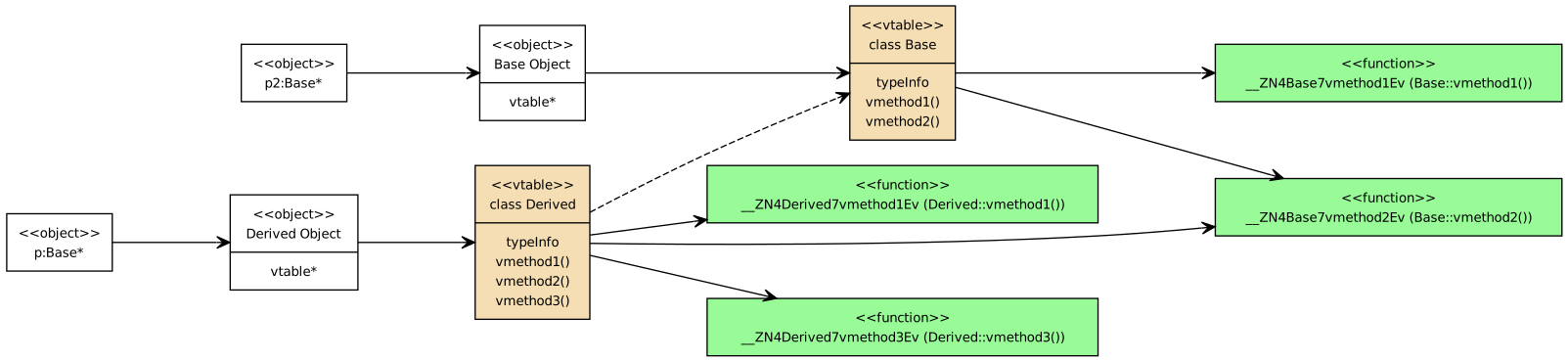
There is no standard diagram to show a vtable. These are my own created using dot notation with GraphViz. GraphViz is for general graph visualization. You can create UML diagrams in GraphViz, but you have to do much more work yourself, unlike yuml. Many of the more complex UML Class Diagrams in the notes, especially for design patterns, use GraphViz as it provides more control over the arrangements of the nodes (classes). The vtable diagrams in the notes were originally done as modified UML Class Diagrams in yuml, e.g., VTable Base Pointer but I converted them to GraphViz.
In this exercise, you will complete a VTable diagram with a new class,
Rectangle, which inherits from the classShape.The diagram already has all classes and all method definitions. You just have to complete the vtable so that the method pointers in the vtable point to the correct function.
The easiest way to work with the diagram is with GraphVizOnline. Start with the base diagram, and add the dot notation for the vtable method pointers to the correct methods. You can use the [Shape and Circle VTable Diagram] for an idea of how to get the edges from the Rectangle vtable to the functions.
To get credit, all edges must be correct. And it must load without errors at GraphVizOnline. Do not save any changes until you verify that it displays a diagram at GraphVizOnline without any errors
You can also convert the VTableRectangle.dot file using the command-line tool,
dotThe
dotprogram is available on macOS and WSL/Linux with the package graphviz. I also added it to the GitHub Codespaces image.Note that
dotis part of a number of graph-drawing algorithms (seeman dot). This one usesfdpto control the placement of the nodes.Due by 4 pm on Fri, Apr 10.
-
Exercise 76: FileIO Posted: Apr 07
The program ReadFile supports multiple ways to read from standard input. You run the program with the option on the command line. The options include get, read, and fileread:
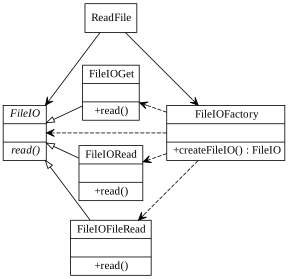
All is well and good, but the program has memory leaks with some options. Use valgrind to determine what the problem is, fix it, and commit your fix. Do not make any other changes.
Valgrind performs dynamic analysis, which means it collects data during the execution of a program. For valgrind, running with one option (e.g., using the option get) may find an issue, but running with another option (e.g., using the option read) may not. To be sure, we have to run the program with all options.
The build command is:
To run with valgrind for option get:
This command is a single line displayed using the line continuation character ("\"). You can copy and paste the entire command.
You must run the command with each option, get, read, and fileread.
The fix consists of only one change to the code. Your code must pass with a clean valgrind report for all three options.
The GitHub Classroom link is in Brightspace.
Due by 4 pm on Fri, Apr 10.
-
Project 4 Posted: Apr 07
Project 4 continues the work on srcFacts. It is due at 11:59:59 pm Tuesday, Apr 21, and involves the following stages which must be performed in order:
Tag v4a Correct the issues in
XMLParserthat affect srcfacts, xmlstats, identity, class diagram, and sequence diagram.Tag template Redesign
XMLParserto use the Template Design Pattern. In this design pattern, extension points are virtual methods. This means new classes that inherit fromXMLParser:srcFactsParserin the new files srcFactsParser.hpp and srcFactsParser.cppIdentityParserin the new files IdentityParser.hpp and IdentityParser.cppXMLStatsParserin the new files XMLStatsParser.hpp and XMLStatsParser.cpp
The pull request
templateadds these new files to your repository and updates the CMakeLists.txt so that they are part of the build. Update your class and sequence diagrams to show this new design.As before, our XML parser needs to provide access to all parts of XMLvia the following extension points from XML notes slide 33
XML Extension Point Attributes Start Document XML Declaration version, encoding, standalone Element Start Tag qName, prefix, localName Element End Tag qName, prefix, localName Characters characters Attribute qName, prefix, localName, value XML Namespace prefix, uri XML Comment value CDATA characters Processing Instruction target, data End Document WARNING Do not pull the pull request for handler until you are completely done with template.
Tag handler Extract a handler from
XMLParsercalledXMLParserHandler, a new class that only handles the user-defined processing (what we previously had as callbacks). Put the entireXMLParserHandlerclass in the file XMLParserHandler.hpp.Then change
srcFactsParser,IdentityParser, andXMLStatsParserto inherit fromXMLParserHandlerinstead ofXMLParser, and rename them by replacing "Parser" in the name with "Handler".The pull request
handlerrenames these files updates the filenames in CMakeLists.txt. Update your class and sequence diagrams to show this new design.If you have issues with the pull request
handler, then you can make these changes manually. You can rename thesrcFactsfiles using git:And then you will need to add the file
XMLParserHandler.hpp. After creating the file , and it can be empty to start, use:Note you will have to commit and push these changes.
You will also have to rename these files in your CMakeLists.txt.
Make sure to update the class names and header comments in these files.
Update your class and sequence diagrams to show this new design.
Warning Once you tag template and move on to handler, you will not be able to change anything for template. So carefully check that you are done with the template part before you tag it and move on to handler
One prevalent issue in these conversions is that changing
XMLParserand srcfacts will cause identity and xmlstats to break until they are converted. To avoid this, understand thatmakeuses the default targetalland meansmake all. So instead of building all executable targets, build them separately as needed, e.g.,make srcfacts,make xmlstats, ormake identity.Keep in mind:
- You are required to implement these steps in the order given, i.e., tag v4a, tag template, and then tag handler
- At every commit, ensure the project compiles, builds, and produces the correct answer. Note that it may be only one of the executable targets that builds during conversion.
- The Template Design Pattern has absolutely nothing to do with the C++ language feature templates. Any use of C++ templates will result in a 0.
-
Week 12 Class 19 Thu Apr 02 Posted: Apr 02
Announcements
- Office Hours My Office Hours on Thursday, Apr 2 are from 12:45 - 2 pm.
- Project 2 Scores and feedback for the Class Diagram are posted in Brightspace. If you want to make changes in Project 3 to the Class Diagram, go ahead and do so. I will grade the most recent version. I also gave a total grade for Project 2, and the part scores now do not add to the final score (only the overall score).
-
Exercise 64: Names The UML Class Diagram shows the class Name with attributes that are single-value optionals.
Convert the class Name in the source code to use
std::optional<std:string>instead of the pair ofstd::stringand a boolean flag. The link for GitHub Classroom is in Brightspace.Due by 4 pm on Fri, Apr 3.
Reminder The type
Stringin a UML Class Diagram does not necesarily map to astd::stringin a C++ program. It could map to astd::string_view, an optionalstd::string, or even a c-string. Which source-code type a UML type maps to is part of the code implementation, and not part of the model.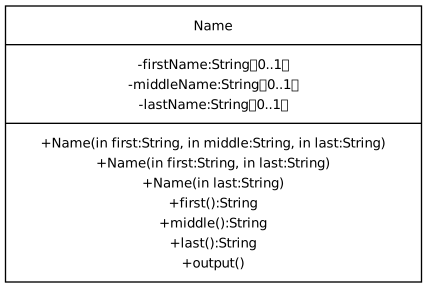
-
Exercise 64: Names Some of the already-submitted Names have some issues:
- Dereference without checking (even those some of the Constructors do not provide parts of the name)
- Assuming that a call to
first()should return an empty string
Agenda
- Notes: UML Generalization
- Exercise 67: UML Generalization Crossword
- Notes: Design Patterns
- Exercise 68: Design Patterns Crossword
- Notes: Dispatch
- Exercise 69: Static Dispatch Worksheet
- Exercise 70: Dispatch Crossword
-
Exercise 71: Static Dispatch
The repository Base has a set of various method call situations, and a way at run time (using
assert()) to verify which method is actually called. Each assertion needs to have one of the following done:- If the call is performed using static dispatch then complete the
assert()in the code that indicates (via a string) which method is called, e.g., form1()is it"Base::m1()","Derived::m1()", or"DerivedDerived::m1()"? -
If the call is performed using dynamic dispatch then do not fill in the answer for the call, but instead comment out the
assert(), e.g.,
Handle each assertion one at a time in order, compiling and running the program (i.e.,
make run) after each assertion is completed. The assertion you edited should pass, and you should be onto the next assertion.You are required to separately commit for each block of statements in the main program.
- All asserts involving static dispatch must be filled in correctly
- All asserts involving dynamic dispatch must be commented out
The GitHub Classroom Invitation Link for Base is in Brightspace.
- If the call is performed using static dispatch then complete the
- Notes: VTables
Unless otherwise noted, exercises are due by 4 pm on Mon, Apr 6
-
Week 12 Class 18 Tue Mar 31 Posted: Mar 31
After Class
- Office Hours My Office Hours on Thursday, Apr 2 are from 12:45 - 2 pm.
Announcements
- Project 2 Scores and final feedback for the Sequence Diagram. Take this into account for your Project 3 diagrams.
- Project 3 I am seeing submissions with incorrect Extension Points. The table shows 11 Extension Points. You can only have 11 Extension Points, and they must match 1-1 to this table.
-
Square Brackets in UML Take a look at this diagram and the corresponding yuml input and note the square brackets for multiplicity:
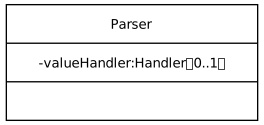
The square brackets around the entire class are not the same as the multiplicity brackets, as the multiplicity brackets:
- Sit slightly higher compared to the outer brackets
- Have whitespace to the left of the '
[' bracket and to the right of the ']' bracket. That is not a separate space next to them. It is part of the bracket character.
These are called fullwidth square brackets. You can copy them from the examples above and paste them in. The hex unicode for regular brackets are
U+005BandU+005D, and for the fullwidth bracketsU+FF3BandU+FF3D.
Agenda
-
Exercise 64: Names The UML Class Diagram shows the class Name with attributes that are single-value optionals.
Convert the class Name in the source code to use
std::optional<std:string>instead of the pair ofstd::stringand a boolean flag. The link for GitHub Classroom is in Brightspace.Due by 4 pm on Fri, Apr 3.
Reminder The type
Stringin a UML Class Diagram does not necesarily map to astd::stringin a C++ program. It could map to astd::string_view, an optionalstd::string, or even a c-string. Which source-code type a UML type maps to is part of the code implementation, and not part of the model.
- Notes: Coupling
- Exercise 65: Coupling Crossword
- Demo: Too many open files
- Notes: UML Association
- Exercise 66: UML Association Crossword
- Notes: UML Generalization
Unless otherwise noted, exercises are due by 4 pm on Wed Apr 01
-
Week 10 Class 17 Thu Mar 19 Posted: Mar 19
After Class
- Project 2 I added a pull request to add the files to the build for tags v3xmlstats and v3identity
Announcements
- Project 2 Issues for v2b through v2e are posted. Scores for the v2* parts are not all posted yet. Feedback for overall class and sequence diagrams is not posted yet.
- Project 3 I am available via email during Spring Break
-
Exercise 56: Convert III
I made the commits offline. Perform them on your own repo. This is optional, so I will drop another lowest exercise score.
Due by 4 pm on Fri Mar 20
Agenda
- Guide: Default lambda Capture
- Guide: Inline Lambdas
-
Exercise 61: Lambda II
Inline all of the std::function uses. Remove the need for the local variable
fand the check iffis defined. For the commit message, start with the actionInlineand finish with the comment on the block:The following is required to receive any credit:
- Each inline is a separate commit
- All must be inlined
- All commits must compile and all assertions pass
- Use proper indentation
- Notes: Dependencies
- Exercise 62: Dependencies Crossword
- Notes: UML Class Relationships
- Exercise 58: UML Class Relationships Crossword
- Notes: RAII
- Exercise 63: RAII Crossword
Unless otherwise noted, exercises are due by 4 pm on Fri Mar 27
-
Week 10 Class 16 Tue Mar 17 Posted: Mar 17
Announcements
Agenda
-
Exercise 56: Convert III
I made the commits offline. Perform them on your own repo. This is optional, so I will drop another lowest exercise score.
Due by 4 pm on Fri Mar 20
- Notes: Lambda Functions - Lambda Parts For reference
-
Exercise 57: Lambda
Follow along in your commits as we explore what we can get from the state from where the lambda is defined.
Note At least one commit must be made during class time, or you can write down at least 3 lambda functions from the exercise on a piece of paper. Failing to do either will result in a 0 for the exercise.
- Notes: UML Class Relationships Will cover on Thursday
- Exercise 58: UML Class Relationships Crossword Due by 4 pm on Fri Mar 20
- Notes: Resource Management
- Exercise 59: Resource Management Crossword
- Guide: Valgrind
- Exercise 60: Memory
- Notes: Dependencies
Unless otherwise noted, exercises are due by 4 pm on Wed Mar 18
-
-
Exercise 60: Memory Posted: Mar 17
The file Memory.cpp in the repository Memory contains many memory resource problems described in the notes.
Compile and run the program on your platform (i.e., your compiler and operating system). You may or may not see a memory-related issue during the build and run.
Go to a system where you can run valgrind. Following the instructions in the Guide: Valgrind, compile and run valgrind on the program.
Fix the memory resource problems in Memory.cpp by:
- Change or add additional
newanddeleteoperators - Fix incorrect index values to fit the comment
Do this for each section one by one committing each section separately. Get the code to the point where it compiles and runs successfully, and you have a clean Valgrind run. For a commit message, use the verb "Fix" and the error given in the
// @errorcomment.If you do any of the following, your score will be a 0:
- Remove/add calls to
producer()andconsumer() - Change
producer()orconsumer() - Change the existing comments
- Use
std::unique_ptr - Add any functions
- Fix more than one block in a single commit
- Improper commit messages
Once done, tag this in Git as memoryfixed. Make sure to
git pushbefore you create the tag.Note: The function
consumer()is not just a function for deleting memory. That is not the entire purpose ofconsumer(). This is indicated by the:which is the universal (code example) symbol for "Other processing will occur, but we are ignoring it for now to make a point". Some example of what could occur in producer/consumer, in addition to memory allocation/deallocation:
Scenario Producer Action Consumer Action Image Processing Load an image from disk Process the image (apply filters, resize, save output) Logging Create a log entry with explanation, severity, and timestamp Write the log entry to a file Database Connection Initialize a database connection Use the connection to execute a query or transaction Asynchronous Task Processing Produce work items (e.g., tasks) Retrieve a task from a shared queue and process - Change or add additional
-
Week 9 Class 15 Thu Mar 12 Posted: Mar 12
Announcements
Agenda
- Notes: UML Multiplicity
- Exercise 52: UML Multiplicity Crossword
- Notes: Lambda Functions
- Exercise 53: Lambda Functions Crossword
-
Exercise 54: Convert II
Following my example in class, mark the concerns and rearrange the code to rearrange the concerns in the file.
- Notes: IoC
- Exercise 55: IoC Crossword
Unless otherwise noted, exercises are due by 4 pm on Mon, Mar 16
-
Project 3 Posted: Mar 12
The main problem with the design for the srcFacts project is the complicated section of code (the large while loop with the main nested-if) surrounding the srcFacts concerns. We have moved much of the low-level parsing details out of srcfacts.cpp (and into XMLParser), but that overall code structure remains.
Change the design of XMLParser to use full IoC (Inversion of Control). IoC lets you move the large while loop with nested-if entirely into an XMLParser method
parse(). The only things that srcFacts will have to do (and the only public methods of the new XMLParser) are theparse()method and (depending on your implementation) methods to register handlers.Your XML parser needs to provide access to all parts of XML, even if srcFacts does not use it, via the following extension points from XML notes slide 33
XML Extension Point Attributes Start Document XML Declaration version, encoding, standalone Element Start Tag qName, prefix, localName Element End Tag qName, prefix, localName Characters characters Attribute qName, prefix, localName, value XML Namespace prefix, uri XML Comment value CDATA characters Processing Instruction target, data End Document There is no explicit part or tag to fix the code from the Project 2 feedback. Fix any style issues in XMLParser or any issues that will cause a problem with Project 3.
Tag v3a: Redesign XMLParser to use IoC with lambda handlers for the extension points. For srcFacts, this means that the lambda functions in srcFacts.cpp contains all the processing of the XML data results, e.g., tag names with none of the XML parsing. Update your Class Diagram and Sequence Diagram to reflect this new design. Rules apply:
- Each extension point has a single handler
- All data passed to the handlers must be via parameters
- Handlers cannot call XMLParser methods
Tag v3xmlstats: Create the application xmlstats that produces a markdown report (similar to what srcFacts does) that indicates the number of each part of XML. E.g., the number of start tags, end tags, attributes, character sections, etc.
Tag v3identity: Create the application identity which is an identity transformation. A transformation is a program that converts data in one format to data in a related format, typically the same format. In this case, it converts from XML to XML. It is an identity transformation because the output XML should be the same (as much as possible) as the input XML. The XMLParser will parse the input, and your callbacks will output the XML format. You can assume that there are no CDATA parts, but you must escape all
>,<, and&in Character and CDATA content.Note: Any changes to XMLParser must work with srcfacts, xmlstats, and identity:
- You cannot have a special XMLParser for each application. Only one XMLParser is allowed.
- Any srcfacts, xmlstats, or identity-specific concerns cannot remain in XMLParser
- All three applications, srcfacts, xmlstats, and identity cannot contain any other application concerns. For example, no LOC (Lines Of Code) is collected in xmlstats.
All tags for Project 3 are due Tuesday, Mar 31.
Keep in mind:
- Complete tag v3a first. After that, you can complete tags v3xmlstats and v3identity in any order.
- I will provide pull requests for the programs xmlstats and identity that add the needed files to the build.
- At every commit, ensure the project compiles, builds, and produces the correct answer.
-
Week 9 Class 14 Tue Mar 10 Posted: Mar 10
Announcements
- Exercise 45: Member Initialization Lists Feedback in Brightspace
-
Midterm Exam A copy of your scored exam is in Brightspace Assignments under Midterm.
The scores are not in the Grades yet. To see your grade, you will have to view the scanned copy.
I want to collect some more per-question data before I summarize what the Midterm revealed. Some observed bad things (the list will grow over time):
Agenda
- Notes: Callbacks
- Exercise 48: Callbacks Crossword
-
Exercise 49: Sorts
For each assertion failure:
- Write a predicate function appropriate to the sort directly in sorts.cpp
- Pass the predicate function for the comparison argument
Rules:
- No templates
- No function objects (functors)
- No additional files
GitHub Invitation link in Brightspace.
- Notes: Method Stereotypes
- Exercise 50: Method Stereotypes Crossword
- Notes: Convert
-
Exercise 51: Convert
Following my example in class, first mark the current concerns. Then, rearrange the concerns in the file to separate them.
GitHub Invitation link in Brightspace.
Unless otherwise noted, exercises are due by 4 pm on Wed Mar 11
-
Midterm Posted: Mar 05
Announcements
-
Midterm Exam Today, Thursday, Mar 5
- In our regular classroom
- Paper is provided and no computer needed
-
Feedback
- Project 2 v2c Sequence Diagram Feedback in Brightspace if you did v2c and had a sequence diagram.
- Project 2 v2c Class Diagram Feedback in Brightspace if you did v2c and had a class diagram.
- Exercise 42: Utilities II Feedback and scores in Brightspace. Definitely check this because naming and parameter passing are on the Midterm.
- Exercise 34: Sequence Diagram II Feedback and score in Brightspace. Sequence Diagrams are on the Midterm.
- Project 2
-
Exercises Due by 4 pm on Mon, Mar 9
- Exercise 45: Constructors and Initialization Crossword
-
Exercise 46: Member Initialization Lists Mistake in the CMakeLists.txt file for the Image directory. It refers to:
It should be:
You can make (and commit) this change. If you have problems, let me know and I can do it for you.
- Exercise 47: Encapsulation Crossword
-
-
Week 8 Class 13 Tue Mar 03 Posted: Mar 03
After Class
- Project 2 v2c Sequence Diagram Feedback in Brightspace if you did v2c and had a sequence diagram.
- Project 2 v2c Class Diagram Feedback in Brightspace if you did v2c and had a class diagram.
- Exercise 42: Utilities II Feedback and scores in Brightspace. Definitely check this because naming and parameter passing are on the Midterm.
- Exercise 34: Sequence Diagram II Feedback and score in Brightspace. Sequence Diagrams are on the Midterm.
-
Exercise 46: Member Initialization Lists Mistake in the CMakeLists.txt file for the Image directory. It refers to:
It should be:
You can make (and commit) this change. If you have problems, let me know and I can do it for you.
Announcements
- Midterm Exam
- Know the required definitions
- Project 2
Agenda
- Notes: Constructors and Initialization
- Exercise 44: Memory Allocation Observations
- Exercise 45: Constructors and Initialization Crossword
- Exercise 46: Member Initialization Lists
- Guide: Compilers
- Notes: Encapsulation
- Exercise 47: Encapsulation Crossword
- Notes: Method Stereotypes
Unless otherwise noted, exercises are due by 4 pm on Mon, Mar 9
-
Exercise 45: Member Initialization Lists Posted: Mar 03
The GitHub Classroom link is in Brightspace.
Normally, each these programs would each be in a separate Git repository. We only have them in one repository as separate repos would required four separate invitations.
Fix the code with the following problems in the following order:
- Sensor - compiler error
- Bank - compiler error
- Temperatures - compiler error
- Image - compiler error
- Image - implement
@TODO
Do not:
- Rename any variables, parameters, or fields/data members
- Change the type of anything
- Add any comments
- Add any methods, functionality, etc.
- Use
this->to fix
Perform each change in a separate commit
Note that the Bank problem is really a compiler warning, not a compiler error. However, it is more complicated than that. While
clangissues a warning,gccdoes not. Here is theclangwarning:You will want to compile with both
gccandclang. See the Guide: Compilers for instructions. -
Week 7 Class 12 Thu Feb 26 Posted: Feb 26
After Class
- Project 2 See the adjusted due dates
Announcements
- Midterm Exam
- Project 2
-
Exercise 37: Create a UML Class Diagram Scores in Brightspace. Common issues:
- Invalid UML types
staticoperator- Missing type separator, i.e.,
: - Displays with commas, i.e., input is not separated by
;and may require to be on one line - School and process related comments, e.g.,
// Exercise ...and// Add ...
-
Exercise 39: Utilities Scores and feedback in Brightspace. I took off for:
- Objects passed by value instead of const reference, e.g.,
std::vector<int> v - Scalar values passed by const value, e.g.,
const int - Doxygen comments that are missing, incomplete, or contain errors
@TODOs that are incomplete or not completed- Poor naming
- Objects passed by value instead of const reference, e.g.,
-
Zero-Tolerance Policy
The following are fundamental design choices at the C++ level that we have spent more than enough time on. To make sure the message is received, any violations of the following will receive a 0 on the exercise, project, or test question:
- Passing
std::stringby value, e.g.void f(std::string); - Passing
std::vector<>by value, e.g.,void f(std::vector<int>); - Passing by
constvalue, e.g.,void f(const int n);
For why we do not pass large objects by value, see the Benchmarks
- Passing
Agenda
- Exercise 41: min min min In class
-
Exercise 42: Utilities II
If you received a non-zero score for Exercise 39: Utilities, your score on that exercise will be replaced by this score if this score is higher. So if you got a 7/10 on Exercise 30, and you get a 10/10 for Exercise 33, your Exercise 30 score will change to a 10/10.
Using the feedback in class, improve your function declarations for the Utilities code. I suggest a commit for each change of a function name, e.g.,
Rename ..., and each change of a parameter type, e.g.,Change ....Other changes to consider:
- Make sure to correctly identify
[in],[out], and[in/out]. I saw some[in/out]that is really[out]. If the previous contents of a parameter are not used in the function, and the parameter value is changed, it is an[out]. - You can pass data out from a function via a parameter or the return value. Do not use both for the same data.
- Make sure to correctly identify
- Notes: Iterator
- Exercise 40: Iterator Crossword
- Notes: Cohesion
- Exercise 43: Cohesion Crossword
Unless otherwise noted, exercises are due by 4 pm on Fri Feb 27
-
Midterm Exam Posted: Feb 26
The Midterm Exam is during class time in our regular classroom on Thursday, Mar 5.
You are responsible for the following:
- Software Design - Definition, the two types of design (so far), where they come from, what they are concerned with
- Software Design Characteristics - Know the list of characteristics
- Algorithmic Decomposition - Definition and how it works
- Structure Diagram Given code or description, draw.
- Coding Style Given a function declaration or definition, improve the code using the principles we discussed in class. This includes proper parameter passing.
- Function Design Given a description, create a function declaration with a proper Doxygen-style comment. Parameter passing must follow the coding-style rules.
- Generalizing Functions - Given an example function, show how to generalize it
- Physical Organization - Include guards, header comments, function comments, and separate function declarations and definitions
- Naming & Method Naming Standards - Given a list of names, correct the poor names
- Iterator - Four basic operations in GoF terms and C/C++ operators
- Free-Function Stereotypes - Know the terms and be able to write a free function for each stereotype
- Concerns - Definition, separation of concerns, be able to identify concerns
- UML Sequence Diagram Given a scenario, be able to draw a sequence diagram
- XML Know what is and what is not an XML concern
- UML Class Diagram - C++ code ⇨ diagram, diagram ⇨ C++ code, single class only (no relationships)
- Organizing Functions - free functions in a file, in a namespace, and as static methods of a class
- Cohesion - Definition
- Encapsulation and Information Hiding - Definition of each
, the encapsulation rule and the information hiding rules. Member Initialization List - Order of field creation, proper use of member initialization list
The exam has a variety of problem types, including short-answer, definition, comparison, diagramming, and coding.
The questions are based on what I covered in class, including the exercises and projects. If I did not cover it in class, it is not on the exam.
-
Week 7 Class 11 Tue Feb 24 Posted: Feb 24
Announcements
- Project 2 See revised due dates
- Project 2 Pull request for starting XMLParser files
- Exercise 37: Create a UML Class Diagram Issues with yuml.me. Deadline extended to Wednesday. If you did already finish, then take a careful look at yours versus the posted diagram.
Agenda
- Notes: UML Class Diagrams Finishing up
Note Production code styles only indent the class members (methods and fields) once. In general, the access specifiers, e.g.,
public, are not indented. Follow this style. - Notes: Scope
- Exercise 38: Scope Crossword
- Exercise 39: Utilities
- Guide: Boolean Expressions
- Notes: Iterator
- Exercise 40: Iterator Crossword Due after next class meeting
Unless otherwise noted, exercises are due by 4 pm on
-
Exercise 39: Utilities Posted: Feb 24
Provide a single function declaration in the file Utilities.hpp and a single function call in UtilitiesExamples.cpp for each
@TODOin UtilitiesExamples.cpp. Once you do, remove the@TODOfor that block. The function declarations in Utilities.hpp must follow the order of the examples of the call in UtilitiesExamples.cpp.Do not implement the function Do not provide a function definition Only provide the declaration and example single call using allof the variables given. The function declaration must be complete enough so that it would be possible to implement the function.
Make sure the program compiles. There is a CMake build provided. However, since you are not providing a function definition, the program will not link or run successfully.
Until you are all done, there are warnings about
-Wunused-variableand-Wuninitialized(depending on the compiler). Do not fix them directly, but implement the function declarations and calls.For each function declaration, include a Doxygen comment that describes the function and describes what data is IN, OUT, or IN/OUT. An example is already in the include file. Note that Doxygen comments start with
/**. The fileDOXYGEN.mdcontains instructions for generating Doxygen documentation and on how to view it.Finish the problem for each
@TODO, remove the@TODO, and then commit. Each commit should complete one@TODO. The first one is completed as an example.If any of the following occur, then the entire exercise score is a 0:
- Function definitions
- Does not compile (expected to not link)
- Object files, e.g., UtilitiesExamples.o, in the repository
- Additional includes
- Any code changes besides adding function declarations and implementing
@TODOs - Any remaining
@TODOs, i.e., you have to declare them all - Use of any other files
- Use of C++ standard library functions
- Use of C++ templates
-
Week 6 Class 10 Thu Feb 19 Posted: Feb 19
Special Note The yuml.me site is experiencing problems. Due dates for class diagrams are extended. Other parts of tag deadlines are not extended.
Additional Special Note The yuml.me site is back up. I will be lenient on the class diagrams for Project 2, but get the Class Diagram exercise completed so I can give you feedback.
After Class
Announcements
- Project 1 Issues in GitHub, scores in Brightspace
- Issues for v1d
- Issues for v1e
-
v1e Issue: Code assumes unique attribute and value
The code that counts the number of line comments assumes that the comment element is the only element that has the form:
<... type="line">While not verified, it is also probably the case that the code for counting the number of literal strings has the same limitation.
These elements do have these forms. But assuming this is true for all other srcML elements, current or future, is an assumption that is never stated or described. The choice is to describe in excruciating detail why this is the case, how someone could detect it, and what to do with their data when this happens. This requires forms that have to go to legal and be filled out in triplicate.
Another choice is to fix the problem.
I will not take points off for this issue. However, I expect it to be fixed:
- It is easy to make assumptions about our input data for programming ease or program optimization
- All assumptions must be clearly defined
- A better choice is to remove the assumption
- It is often easier (and better) to remove the assumption than it is to work around it
- So if you can remove the assumption without much effort, it will pay to do so
- There are exceptions as dealing with uncommon usages may delay delivery for common usages
- Project 2 See Due Dates
-
XML Parsing Concerns && xml_parser.hpp XML parsing concerns belong in xml_parser.cpp. The role of xml_parser.hpp is not to support xml_parser.cpp, but to allow the use of the functions in xml_parser.cpp to be called by external code, e.g., srcfacts.cpp.
XML concepts belong in xml_parser.hpp. XML parsing details belong in xml_parser.cpp.
- Guide: Parsing Concerns Tool to visualize concerns in srcfacts.cpp
-
Doxygen Function/Method Comments In the Utilities assignment today, the given example is
The first line of text is the brief description. Note the blank line after it before the param. That is the style used by the Doxygen documentation, and many style guides. In fact, the
@parampart requires a blank line between it and the brief description. - Exercise 33: Sequence Diagram Scores and feedback in Brightspace.
Agenda
-
Exercise 34: Sequence Diagram II Based on my feedback, fix your sequence diagram from Exercise 33: Sequence Diagram
- If you received a 10/10 on Exercise 33, no work is needed
- If you did not do Exercise 33, you have a 0 on this exercise
- If you got any other score, then fix the diagram
- If you don't fix the diagram, you get a 0
Use the same repository.
- Notes: Naming Now the rest
- Exercise 35: Naming Crossword
- Notes: UML Class Diagrams
- Exercise 36: UML Class Diagrams Crossword
-
Exercise 37: Create a UML Class Diagram
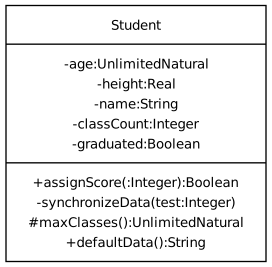
Create a UML Class Diagram at yuml.me for the class diagram on the right.
Compose your class diagram at yuml.me. The resulting contents of the box on yuml.me will go into the file ClassDiagram.txt in the GitHub Classroom Repository (link in Brightspace). You should be able to copy the contents of the file ClassDiagram.txt and paste it into the editor at yuml.me and see the diagram on the right.
Your final result should look exactly like the image shown here. The style used for the image is Boring, instead of the default Scruffy or Plain.
Make sure to commit after each of the following parts:
- Name of the class
- Attributes
- Operations
Note that yuml.me can be temperamental. Add iteratively and carefully. Commit often, as you might find yourself breaking your previously working diagram.
Note Due date extended. Due by 3:30 pm on Wed Feb 25
Unless otherwise noted, exercises are due by 4 pm on Mon Feb 23
- Project 1 Issues in GitHub, scores in Brightspace
-
Week 5 Class 9 Thu Feb 12 Posted: Feb 12
After Class
- Project 2 Due date changes.
- Project 1
- All issues and scores for v1d and v1e are posted
Across all students, there were over 600 functions created and the number of issues for v1d was over 300. And many of the v1d issues referred to multiple function names. I use scripts to detect certain things, but I have to manually examine them. Whether generated by a script and manually examined, or done entire manually, mistakes can happen. If there is a question, then ask.
-
Exercise 31: TRACE
TRACE Session Record of the terminal session streamed live in class.
Announcements
- President's Day Observance No class or Office Hours on Tuesday, Feb 17
- Exercise 26: srcFacts Concerns Quiz Answers
- Project 1
- Every function should have single purpose. Do not make a function try to be an Accessor::predicate and Mutator::command. Use separate functions for each.
- If your xml_parser functions refer to srcML, srcFacts, or srcfacts concerns, then they violate the rule of none of these concerns in xml_parser. Specifically, if they contain expression counts or use srcML tags, such as "expr", then they violate a primary design rule for this project. Remove them immediately.
- Project 2 Available via this link or the Archive. Not on the main page until Project 1 expires.
- Guide: asciinema
Agenda
- Notes: Generalizing Functions
- Exercise 29: Generalizing Functions Crossword
- Notes: Naming Motivation only for now
- Notes: Method Naming Standards We will follow these naming standards in this course.
- Exercise 30: Method Naming Standards Crossword
-
The BUILD.md file contains instructions on turning TRACE on and off
Demonstrate the running of your program with TRACE on for a:
- Line comment
- Short block comment
- Doxygen block comment
You will have to create the srcML for each of these code examples. Use the srcML Playground. Keep the examples as short as possible (i.e., only include a comment). Download these files and have them ready before you start the screencast. Also before the screencast, build with the TRACE option on.
The form to submit the asciinema link is in the title of this exercise.
To make the output cleaner, redirect the generate table to a file
./srcfacts < FILENAME > report.md - Notes: Event States
- Notes: Grouping Functions
- Exercise 32: Grouping Functions Crossword Due by 4 pm on Tuesday, Feb 17
- Notes: Sequence Diagrams
-
Exercise 33: Sequence Diagram Due by 4 pm on Tuesday, Feb 17
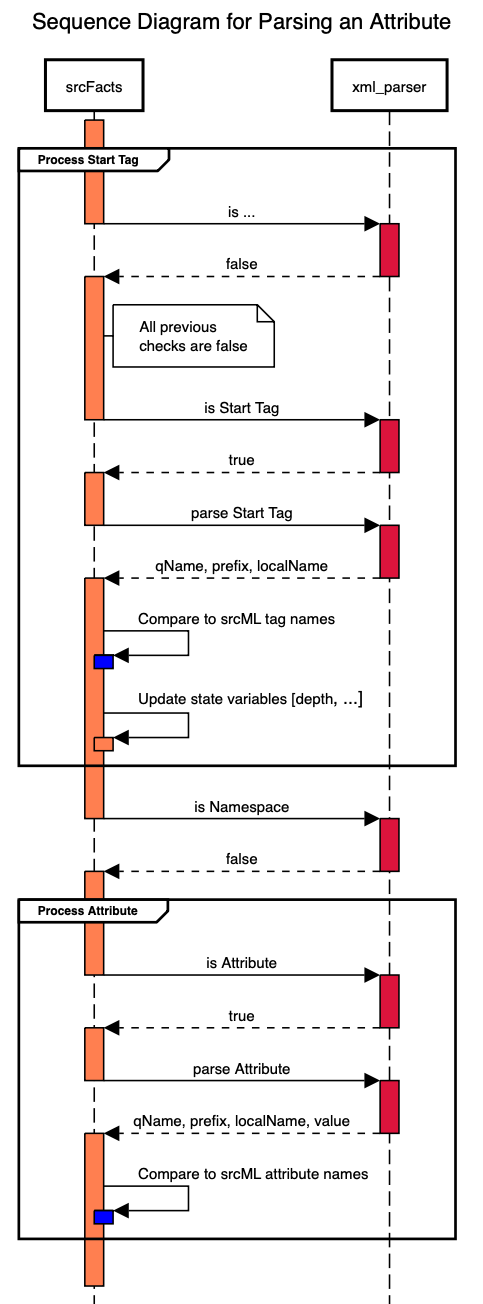
Create a sequence diagram at SequenceDiagram.org for the diagram on the right, which is for parsing a start tag with an attribute.
Start with the SVG file with the GitHub Classroom Repository link at Brightspace, and commit your changes to that repository.
Your final result should look exactly like the image shown here.
Make sure to save as a SVG Image File (vector image with embedded source text)
Unless otherwise noted, exercises are due by 4 pm on Fri Feb 13
-
Project 2 Posted: Feb 12
Continue to improve the design of srcFacts using more language features. There are no changes to the functionality of this project, only to the design.
In addition to the following code changes, you will maintain two modeling diagrams. There is a pull request to add the starting files to your repository.
- A UML Sequence Diagram, SequenceDiagram.svg, to model the relationship and control between srcfacts.cpp, the xml_parser functions, and the class XMLParser. In particular, you must show the same function/method calls used for each part. The sequence diagram for the sequence diagram is at sequencediagram.org. Make sure to export and save it as SVG.
- A UML Class Diagram, ClassDiagram.txt, to model the class you create. This means showing the UML form of all fields/data members and member functions. The format for the diagram class diagram is the text yuml.me format.
The diagrams must be updated to reflect the code for each tag. So do not tag until the part below is done and any diagrams are updated.
Tag v2a Implement and close all issues I created as feedback from Project 1. When you finish fixing an issue, at least one commit must describe what you are changing. Add your calls' exact function names and (UML form of) parameters to the xml_parser for the sequence diagram. Due
Feb 18Feb 20Tag v2b Create a namespace,
xml_parser, for the functions in xml_parser.{hpp,cpp}. This will involve making changes to the files srcfacts.cpp, xml_parser.hpp, and xml_parser.cpp. DueFeb 20Feb 23From this point on, do not change the files xml_parser.hpp or xml_parser.cpp.
Tag v2c Create the class
XMLParserin the files XMLParser.hpp and XMLParser.cpp where the methods call the free functions from xml_parser.hpp. Do not use any fields/data members. The method parameters must be identical to the parameters of the free functions in xml_parser.hpp. Add the XMLParser as a participant for the sequence diagram and show how it is involved between srcFacts and xml_parser. DueFeb 24Feb 27Mar 3Tag v2d Eliminate any parameters in the XMLParser methods that you can, replacing them with field/data members in the class. In other words, move as many XML parsing variables from srcfacts.cpp as possible. Do this one field/data member at a time. For the class diagram, show the added fields and the removal of parameters. For the sequence diagram, update the parameter lists of the calls to the XMLParser. Due Mar 9 by 9 am
Tag v2e Inline the calls to the xml_parser free functions into your XMLParser methods. Inlining the calls does not mean adding the
inlinespecifier, and it does not mean changing anything in XMLParser.hpp. Do this one free function call at a time. Ultimately, your XMLParser.cpp should have no calls to xml_parser functions and will not need to include xml_parser.hpp. Do not make any changes to the files xml_parser.{hpp,cpp}. For the sequence diagram, remove the xml_parser participant and any calls. Due Mar 9 by 9 amEnsure the project compiles, builds, and produces the correct answer at every commit with GCC and Clang.
There is a zero-tolerance policy for the following. A zero-tolerance policy means that you will receive a zero for that part if any of the following are violated:
- At every tag,
v2a,v2b,v2c,v2d, andv2e, the program must compile and build in gcc and clang without errors or warnings. - All data members/fields must be
private - No mention of srcML or use of specific srcML element names (or attribute names/types) in the files XMLParser.hpp, XMLParser.cpp, xml_parser.hpp, or xml_parser.cpp.
-
Week 5 Class 8 Tue Feb 10 Posted: Feb 10
Announcements
-
Project 1 v1b Feedback for Project 1 v1b is posted as issues in your GitHub repository:
Do not change tag
v1b.You will need to fix these issues at some point.
-
Project 1 v1c Feedback for Project 1 v1c is posted as issues in your GitHub repository:
-
Project 1 v1d
- If you have any srcFacts or srcML concerns in xml_parser then you are going in the completely wrong direction. In fact, what you are doing is worse than the existing code. Evidence that you are doing this is a single xml_parser function which tends to have a lot of parameters.
- Cannot change the output. Design change must avoid breaking the program (build or runtime results) at all costs.
- Direction of parameters: Algorithmic Decomposition
- XML Interface Concepts: XML
- Accessor::Predicate Stereotype: Free-Function Stereotypes
- Accessor::Predicate Stereotype Example: Free-Function Stereotypes
-
Exercise 10a: IOBuffering and Exercise 10b: Software Design Characteristics Quiz.
- Due to numbering conflict, renumbered Exercise 10: IOBuffering
- Exercise 10b: Software Design Characteristics Quiz is considered a bonus. I will drop your lowest exercise score.
- You will need to know that list of characteristics for the Midterm. I would also make sure that you know how to run a program directly.
Agenda
- Notes: Concerns
- Exercise 26: srcFacts Concerns Quiz
- Exercise 27: Concerns Crossword
- Notes: Vertical Development
- Exercise 28: Vertical Development Crossword
-
Exercise 20: Rainfall V
Make the same commits in your repository.
- Notes: Generalizing Functions
Unless otherwise noted, exercises are due by 4 pm on Wed Feb 11
-
-
Week 4 Class 7 Thu Feb 05 Posted: Feb 05
After Class
- Project 1 Part v1b graded. Feedback as issues in GitHub (look for the label v1a), and scores out of 20 in Brightspace.
Announcements
- Project 1 Posted due dates for parts v1c to v1e
- Project 1 Your repository has a pull request for xml_parser to use for part v1d. After you accept the pull request on GitHub, you have to
git pullit into your local repository (even in a codespace). - Guide: srcML Guide to using srcML. I will add some more instruction to this.
-
GitHub Codespaces I updated the image, srcml/codespaces, used by our projects in the codespace container. Besides new versions of the installed packages, including
cmake, you can now use the manual utility,man g++, and evenman srcml.When an image is updated, existing codespaces are still using the old image. To use the new image, you must start a new up a new codespace. You also probably want to delete the old one so you don't get confused. Make sure you committed and pushed in the codespace
- Exercise 22: For Semantics II due by 4 pm on Fri Feb 6
-
Exercise 21: Include Guard Name Quiz Available after class from a link in Brightspace.
You may want to review your notes on include guard names before taking it. Answers must be exact.
Agenda
-
Exercise 23: Role of Include Files
For each of the following, write the code necessary to call the function. Include all error handling:
- Combine.cpp uses Move.hpp
- ReadFile.cpp uses ReadLine.hpp
An include file is not for the developer of the corresponding .cpp file. It is so that the developer calling the function can use it, and use it properly. It has to be sufficient for the developer to call the function, but not include anything more.
Facts
- The number of developers and times a function is called is much higher than the number of developers who write (or modify) a function.
- Most users of a function will not have access to the implementation file.
- Even if a user of a function has access to the implementation file, they do not want to read it to figure out how to call a function.
The results of part v1b is that overall there is a misunderstanding of the purpose of an include file.
From the function caller's perspective:
- Clear, single include file to use the feature. The include files is self-sufficient and I can include it wherever I need it in whatever order I want.
- The include file has no extra dependencies (e.g., include files that are not needed).
- The include file has a function declaration which gives me the name, parameters, and return type.
- The include file has comments and naming that tells me what the parameters are for.
- The include file has comments describing the general purpose.
- The include file has comments given specific return values (or OUT values) and what they mean.
- The caller of a function does not want access to the function definition.
- They will most likely use the function from a library, which does not contain the original source code.
- They don't care about the original source code.
From the function developer's perspective:
- They provide the include file so that others (and themselves) can easily call the function.
- The better they meet the needs of the callers of the function, the more people will use the function.
- The more people that use it, the less of a problem they will be to the developer of the function if the include file is good.
- Guide: Coding Standard
- Exercise 24: Coding Standard Crossword
- Notes: Free Function Stereotypes
- Exercise 25: Free Function Stereotypes Crossword
- Notes: Concerns
-
Exercise 20: Rainfall V Continuing on using the workflow from Rainfall I. As before, you can follow along and see the commits that I make in class:
Unless otherwise noted, exercises are due by 4 pm on Monday, Feb 9
-
Week 4 Class 6 Tue Feb 03 Posted: Feb 03
After Class
- Project 1 Remaining due dates posted
- Exercise 20: Rainfall V Delayed until next class
- Exercise 21: Include Guard Name Quiz Delayed until next class
Announcements
-
Project 1 v1a Scores (out of 20 possible) are in Brightspace for Project 1. The feedback is in GitHub in the Issues tab of your repository. Issues include:
- Missing tag v1a
- Inconsistent spacing
- Inconsistent spacing around keywords
- Mixed tab and space indentation
- Unnecessary comment
Do not expect that every part (e.g., v1b) will be graded before the next part is due. This part is straightforward. The remaining parts involve more complex coding. Also, for some parts, I want to grade the parts together.
The first step of Project 2 will be to fix these issues. You can fix these issues now or later. For small changes, I suggest now. Use a commit message that starts with "Fix". After the issue is fixed, close the issue.
- Project 1 v1c Added the due date for tag v1c. The Coding Practices Task List is an issue in your GitHub repository.
- Exercise 10: IOBuffering The grades and feedback are temporarily hidden while we fix an exercise naming issue.
Agenda
-
You will not be asked to explain or define any XML terminology as part of any exam. However, to discuss the project's problem domain, we require this terminology.
You need to understand that the parts of XML are a concern, the implementation of an XML parser is another concern, and the specific element names for srcML are another concern. We will cover the idea of a concern later on.
- Exercise 18: XML Crossword
- Notes: Coding Style
- Exercise 19: Coding Style Crossword
- Guide: Coding Standard
- Notes: Rainfall Coding Practices
-
Exercise 20: Rainfall V Continuing on using the workflow from Rainfall I. As before, you can follow along and see the commits that I make in class:
Delayed Until Next Class
-
Exercise 21: Include Guard Name Quiz Available after class from a link in Brightspace.
Delayed Until Next Class
You may want to review your notes on include guard names before taking it. Answers must be exact.
- Exercise 22: For Semantics II due by 4 pm on Fri Feb 6
Unless otherwise noted, exercises are due by 4 pm on Wed Feb 04.
-
Exercise 22: For Semantics II Posted: Feb 03
If you did not take the Exercise 8: For Statement Quiz nor do Exercise 17: For Semantics I, then you cannot do this exercise, as it is based on your work on the quiz.
In your for semantics repository is a file ForSemantics.cpp. It has a set of separate test cases with some setup, the code to evaluate, and an answer checked via an
assert(), e.g.,Each test case is in its own block statement to isolate its scope. The test cases are scenarios of using the original code from the quiz, followed by a test case with your individual answers. There are multiple scenarios for each example/answer from the quiz.
One special case is for Q3, which gave you macros (e.g.,
INCR) instead of the actual code. For that one, we used the preprocessing#defineto make them into statements.This is a non-standard use of preprocessing statements, so don't treat it as a general solution.
A CMake configuration is provided. So use the standard procedure to configure and build. There is no target
runprovided in the Makefile, so you will have to run the test program on the command line.So your job is to:
- Fix the indentation in a single commit. Depending on how you entered the code in the quiz, it might not have proper indentation after it is injected. Do this in a single commit.
- Fix any naming in a single commit. Some of you decided to rename the loop-control variable. Since it was
iin the original for-loop, it should beiin the semantically-equivalent while-loop. Notcount,vCount, orq. Besides,iis the standard name for a counter in a loop. - Replace any declaration statements with multiple declarations into separate declarations, e.g., change
int total = 0, i = 0; - Fix the compile errors one-by-one with a separate commit for each test case. All of the test cases that use the original for-loop will pass, so the compile errors are because your while-loops are not semantically equivalent to the original for-loop. This tends to be a variable scope problem.
- Once the compiler errors are fixed, you need to see if the test cases pass. Run the program and fix the code so that the assertions pass. Commit one fix at a time. As with the compiler errors, the assertion errors are because your while-loops are not semantically equivalent to the for-loops. Note that once an assertion fails, your program stops. So you will end up fixing this from top to bottom.
You can only change what is between the
// @STARTand// @ENDcomments. Changes to any other places in the code will result in a 0 on the exercise. -
Week 3 Class 5 Thu Jan 29 Posted: Jan 29
After Class
-
Project 1: v1a Scores for v1a are in Brightspace. Any feedback is in the form of issues in your repository.
By Project 2, you will need to fix these issues. However, you can go ahead and fix them now. If you fix an issue, then mention it in the commit messages, and Close the issue in GitHub.
Announcements
- Project 1 Check due dates
- Exercise 9: Rainfall II Report in feedback branch, Report2.md. Score and feedback in Brightspace. Also Rainfall III.
Agenda
-
With a few exceptions, the use of proper Git Commit messages is not a part of the grade for the projects or exercises. However, you should try to follow the rules because it is:
- Essential for group projects
- Good practice for real-world projects
- A skill that takes practice
- Allows me to monitor what students are working on and what they have completed
- Allows me to assist you individually
- Guide: Git Commands
- Exercise 14: Header File Quiz
- Notes: Separate Compilation
- Exercise 15: Separate Compilation Crossword
- Notes: Rainfall Coding Practices
-
Exercise 16: Rainfall IV
Continuing on using the workflow from Rainfall I
As before, you can follow along and see the commits that I make in class:
-
Exercise 17: For Semantics I
The For Statement Quiz had three
forstatements that you had to convert to using thewhilestatement:No one got the entire conversion correct. Given the question's setup, many got the first two on a technicality, but no one got the third one completely correct. So I am going to have you fix your answers.
For part I, you only need to create the repository for the exercise. Once you do that, I can give you the problem starting with your answers on the For Statement Quiz. In part II (not assigned yet), you will fix the conversion to a while so it works correctly.
The reason for the split between parts I and II is that I cannot provide custom code until after the repository is created, and only you can create the repository.
If you did not take the For Statement Quiz, then you cannot do this exercise as it is based on your work on the quiz.
Unless otherwise noted, exercises are due by 4 pm on Fri Jan 30
-
-
Week 3 Class 4 Tue Jan 27 Posted: Jan 27
Announcements
-
GitHub Classroom Error
If you get the following:
Go to your GitHub account. From the icon on the far right top corner, select "Organizations". There you will see an invitation to accept the project.
- Exercise 8: For Statement Quiz and Exercise 9: Rainfall II Feedback and grades are not ready yet.
-
make run- The users of a program will not have
makeso they cannot usemake run. - The users of a program will want to run the program with their own data, not the demo data of a project.
- Knowing how to run the program directly on the command line is required of every developer of a project, because that is how a user would run it.
- The Rainfall project has a target
runfor the Makefile, i.e.,make run. This was provided because the main program,rainfall, required an input file (the rain data) sent via standard input. - When programs have required input files or required options, a
make runis often given as an example, along with demo data. It is not expected thatmake runis the only way to run the program. - So, when there is no provided
make run, do not add one to the CMake files (this is not DevOps). Run the program directly. - In class, showed running IOBuffering directly from the command line.
- The users of a program will not have
Agenda
-
Exercise 10: Software Design Characteristics Quiz
Link to form provided in Brightspace during the quiz time.
-
All project due dates are 11:59:59 pm.
-
Build and run the Project 1 srcfacts program performing the following:
- Clone the repository and move to the repo directory (Not required if you are using GitHub Codespaces or have already cloned the repository)
- Create the build directory - If you already have a build directory, delete it first
- Move to the build directory
- Create the build using
cmake - Build the project using
make - Run the program with the demo
make run - Run the program with the demo directly, not using
make -
Enter the following command:
To demonstrate this, you will record a terminal session using asciinema, as we did in Exercise 10: IOBuffering.
IMPORTANT The URL should not contain "connect" or be a local file. Test your URL in a browser verifying that it shows the session you recorded. An incorrect URL will receive a 0.
- Notes: Algorithmic Decomposition
- Exercise 12: Algorithmic Decomposition Crossword
- Notes: Rainfall Coding Practices
-
Exercise 13: Rainfall III
Continuing on using the workflow from Rainfall I
As before, you can follow along and see the commits that I make in class:
If you have any questions or issues, make sure to contact me.
Unless otherwise noted, exercises are due by 4 pm on Wed Jan 28
-
-
Project 1: srcFacts Posted: Jan 27
To fix bugs and add new features to software, you have to understand the source code. One approach is to count things, such as the number of statements, functions, classes, expressions, and LOC (Lines Of Code). The program
srcfactsproduces a report of these counts for a C++ program.Writing code in a program to directly parse C++, i.e., identify the syntactic parts of the code, is very difficult. So, the
srcfactsprogram does not parse the C++ source code. It uses another tool, srcML, to convert the C++ source code into an XML format. Thesrcfactsprogram inputs this XML format, parses the XML while collecting counts of parts of the input code, and produces the report. The input has to be in the srcML format, e.g., demo.xml, however it can be compressed or part of an archive, e.g., demo.xml.zip, linux.xml.gz.The srcfacts.cpp program is one large, main() function using almost no design features. It is extremely fast; for example, it can produce a report on the entire Linux kernel (verison 6.18.7, 60,392 source-code files, an 4.7 GB file in the srcML format) in under 8 seconds. However, in its current form, it is not easy to debug the XML parsing, add additional program element counts, or even understand what is going on. It includes code for parsing all parts of XML, but it would not be easy to adapt the XML parsing code for another purpose, e.g., another report. The only way to reuse this code is by copy/paste reuse. Overall, it has the following:
Design Characteristic Level Scalability Very High Performance Very High Portability Medium Usability Medium Modularity Very Low Extensibility None Reusability None Maintainability None Your task is to take the srcfacts code, improve the overall design, and extract the XML parsing part of the code. When completed, a set of functions in the files
xml_parser.hppandxml_parser.cppwill handle as much XML parsing as possible, while the main program,srcfacts.cpp, generates the report using the XML parser functions for parsing.- You do not have to understand how to parse XML. You are only repackaging XML parsing code, not writing from scratch.
- The existing code is brittle, so you need to work carefully not to break the code
- The repository includes example input
- Keep in mind all aspects of design as we discuss them in class
The steps (in order) with the associated (git) tag are:
Tag
v1a: Without changing the design, add the code necessary for the report to include the number of return statements. First see how the other counts are collected, then use it as a guide. Do not make any other changes to the project. The heading in the table must be "Returns". Due Jan 30Tag
v1b: Move therefillContent()function into the separate refillContent.hpp and refillContent.cpp files. The build is already configured for these files. Due Feb 4Tag
v1c: Apply the specific design changes from the Coding Practices Task List (an issue in your repository). As you verify that the code follows the practices given, check them off. Once you have completed all of them, close the issue. Due Feb 9Tag
v1d: Extract a set of (free) functions to handle the low-level details of the XML parsing. Put the declarations into xml_parser.hpp and the definitions into xml_parser.cpp. Extract one function at a time, i.e., each commit can only include a single extracted function. Due Feb 13Tag
v1e: Add the necessary code to count the number of line comments and literal strings. The headings in the table must be "Line Comments" and "Strings". Due Feb 13Your repository for this project is through GitHub Classroom, with a link on the Brightspace course page.
- Projects in this course build on each other. Failure to complete Project 1 will impede progress on Project 2.
- Steps must be completed in order, e.g., Step
v1amust be completed before Stepv1b. - Your code must compile with both
g++andclang. An easy way to verify is with GitHub Codespaces. - Be sure to follow the good practices we discuss in class
- There are no
classes orstructs created for this project. You are extracting a set of free functions. Any class you create to solve this problem now would not solve the primary problem of how the srcFacts code uses an XML parser. - The
main()handles XML errors (invalid XML format) with a directreturn 1;so the program exits with the status of1. To exit the program from within any function, useexit(1);which requires the include filestdlib.h. - While you can create and use other branches, only the work on the main branch counts. The main branch is the default when you
git cloneandgit checkout. - The code uses the library libarchive to input compressed and archive files, e.g., linux-6.6.xml.gz and demo.xml.zip. See BUILD.md for details.
General Guidelines
- Code must compile and build
- Do not change the existing format of the output
- Do not add or commmit your build directory
- Follow the programming style of the existing code. E.g., do not change the indentation style.
- Follow all guidelines given in class
-
Week 2 Class 3 Thu Jan 22 Posted: Jan 22
After Class
-
GitHub Classroom Error
If you get the following:
To fix, go to your GitHub account. From the icon on the far top corner, select "Organizations". There you will see an invitation to accept the project.
-
Rainfall II In class, I was committing to the feedback branch instead of the main branch. That his now fixed, so you will see the changes on the main branch. The Report1.md remains only the feedback branch.
Announcements
-
-
I posted a feedback report, Report1.md, in your repository under the branch feedback. I strongly suggest looking at it on GitHub.
Enter this command from your source directory (not the build subdirectory): -
I posted the scores and any additional comments in Brightspace
Report1.md Example report.
Points were taken off for:
- Less or more than 3 commits
- Differences between your code for a commit and my code in the example
- Not following the exact format of the header comment
- Typos in words
- Wrong form of the action in the commit message. It is "Add", not "Added", "Adding", or "add".
Also, do not use term "assignment" or "exercise" in your code. We simulate working on real code.
If you have spacing or wording to fix, you can fix them. However, these commits must start with the word "Fix". Not "Fixing", "Fixed", or "fix", but "Fix".
-
-
TA: Mr. Sumaila Iddrisu si63@uakron.edu
Agenda
-
Notes: Software Design Characteristics
Note: In the next class meeting, I will give an exercise in quiz form that requires you to list all of the software design characteristics.
- Exercise 7: Software Design Characteristics Crossword
-
Exercise 8: For Statement Quiz
Completed during class.
This is an online form. Link will be in Brightspace.
- Notes: Rainfall Coding Practices
-
Exercise 9: Rainfall II
Continuing using the workflow from Rainfall I
As before, you can follow along and see the commits that I make in class:
If you have any questions or issues, make sure to contact me.
- Exercise 10: IOBuffering Due by 4 pm on Mon Jan 26
Unless otherwise noted, exercises are due by 4 pm on Fri Jan 23
-
-
Exercise 10: IOBuffering Posted: Jan 22
Build and run the program
main. You will have to create a build directory, move to the build directory, run cmake, and then build usingmake. See the workflow for Rainfall I for the commands.Now run the program and notice that the output of the debugging statement is not shown. If it does show, run it a few times.
So even though the program reached the output statement, the output using
std::coutwas buffered and the program crash prevented it from completion.Record running the program and not seeing the debugging output in a terminal session using asciinema.
Now, change the debugging statement to use
std::cerr. Rebuild your program, and run it again. This time, you will see the debugging output. Commit this change using the git command:Make sure you
git pushand verify, via a web browser, that these changes are in your files at GitHub.Record running the program and seeing the debugging output in a terminal session using asciinema.
Upload both asciinema URLs using the IOBuffering Form
asciinema
To demonstrate this, you will record a terminal session using asciinema. It records the commands you enter and the output the command produces.
asciinemais already installed in the GitHub Codespaces image. You can also install asciinema on Linux/WSL/macOS.asciinemais relatively straightforward to use.You can play, pause, skip, etc. You can also copy the commands as text. Note that the replay even includes your pauses and any delay as the command is run.
At the end of the terminal session,
asciinemawill show a URL. Anybody can use this URL to view the session. This is what you will submit for the exercise to the link in the exercise title.IMPORTANT The URL should not contain "connect" or be a local file. Test your URL in a browser verifying that it shows the session you recorded. An incorrect URL will receive a 0.
-
Week 2 Class 2 Tue Jan 20 Posted: Jan 20
After Class
-
-
I posted a feedback report, Report1.md, in your repository under the branch feedback. I strongly suggest looking at it on GitHub:
-
I posted the scores and any additional comments in Brightspace
Points were taken off for:
- Differences between your code for a commit and my code in the example
- Not following the exact format of the header comment
- Typos in words
- Less or more than 3 commits
- Wrong form of the action in the commit message. It is "Add", not "Added", "Adding", or "add".
Also, do not use term "assignment" or "exercise" in your code. We simulate working on real code.
If you have spacing or wording to fix, you can fix them. However, these commits must start with the word "Fix". Not "Fixing", "Fixed", or "fix", but "Fix".
-
Special Announcement
Our class will meet online today in Teams. During the meeting, please be muted, but leave your camera on if possible.
Our Team is CPSC 421-010 OOP 2:00 - 3:15 pm. You should see the meeting in your calendar. There is also a direct meeting link in Brightspace. If you have any problems, send a chat message in Teams or an email.
Announcements
- Office Hours Online today from 1 - 2 pm. I will monitor Teams. If you want to meet, start a chat with me in Teams.
- TA We have a TA (Teaching Assistant) for the course, TA: Mr. Sumaila Iddrisu si63@uakron.edu
-
Grades Exercises 1 - 4 are in Brightspace. Read the feedback.
Future exercise posting to Brightspace will not be announced. Delays will be.
- OOP Survey Results Link in Brightspace
- Development Environment Survey Results Link in Brightspace
Agenda
- Guide: GitHub Authentication
- Setup for Exercise 6: Rainfall I
-
Exercise 5: Statement Design Quiz
- Completed during class
- All solutions in a question produce the same result
- Must choose the "best" choice, and state why it is better
- If you complete the Design Quiz, you will get full credit for this exercise
- Notes: Rainfall Coding Practices
-
You can follow along and see the commits that I make in class:
If you have any questions or issues, make sure to contact me.
- Notes: Software Design Characteristics
Unless otherwise noted, exercises are due by 4 pm on Wed Jan 21
-
-
Exercise 6: Rainfall I Posted: Jan 20
Take the starting rainfall.cpp code and make the changes that I make in class. This means the exact same code changes and exact commit message.
Your code is in a repository from GitHub Classroom:
- Log in to your GitHub account.
- Click on the invitation link (GitHub Classroom Rainfall) on the main course page in Brightspace.
- Follow the directions to link your GitHub account to your UA ID.
Environment
-
Local
This would be on your own machine with local files.
First, you need to authenticate your local environment with GitHub: Guide: GitHub Authentication. This only has to be done once per environment, e.g. WSL on Windows.
Then you clone the repository. Cloning creates a local repository that is a copy of your repository at GitHub.
You can get the repo link from the button <> Code on GitHub, then under Local and HTTPS.
Cloning a repository creates a directory with the name of your repository, e.g., _rainfall-
_. To work on the files, you need to move into that directory: -
GitHub Codespaces
GitHub Codespaces provides a development environment in the browser. When you create one from your GitHub Repository, you are already authenticated with GitHub and have a cloned repository, so you can start working right away.
You can start a Codespace from the <> Code button on GitHub, then under Codespaces.
Build Setup
Git Workflow on Rainfall
- Edit files locally, e.g., add a header comment to the file rainfall.cpp
- Build, run, and check your work
- View your changes
- Commit current changes to the local repository:
- Push your local commits to the GitHub repository:
- View and verify your changes at GitHub in your browser Do not skip this verification
- View your commits locally
Note Your code must build and compile. If you have a build warning or error, fix these before making any more changes to the code.
Note You must commit each change that I make separately and use the exact commit message that I use in class
-
Snow Day Posted: Jan 15
After Class
Class on Thursday, Jan 20 will be online in Teams.
You should see a meeting in your Teams Calendar. The name of our Team is _CPSC 421-010 OOP _.
I will also post a direct link in Brightspace.
Agenda
Campus is closed today, so no class.
I am not holding office hours, but am available for questions via email.
In in place of a class meeting, complete the following:
- Read the rest of Notes: Software Design. We covered up to the last slide, 32 . If you type
gon the slide page a Jump to slide appears so you can go directly to that slide. - Exercise 4: Software Design Crossword Due 4 pm on Friday, Jan 16
- Exercise 3: Development Environment Survey Due 4 pm on Friday, Jan 16. I am giving you extra time to fix any issues with the CMake and Ubuntu upgrades.
-
CMake & Ubuntu Versions
As stated in the Development Environment: Tools the cmake version must be 4.2.1 or higher. Some of you have less recent versions, even though the instructions stated you need to be at 4.2.1 for cmake. Follow the instructions to install the APT repository from Kitware (CMake people).
For Linux, upgrade your Ubuntu using:
You should also be on Ubuntu 24.04, not an older version. To convert, first upgrade as above, then enter the command:
Use the Development Environment: Tools to check your versions.
If you make any of these changes, then edit or fill out a new survey.
- Read the rest of Notes: Software Design. We covered up to the last slide, 32 . If you type
-
Week 1 Class 1 Tue Jan 13 Posted: Jan 13
Announcements
- Syllabus
- Office Hours
-
GitHub We use GitHub and GitHub Classroom in the class to manage source code for projects, exercises, and examples. You are required to have a GitHub account.
Optionally, you can apply for the Student Github Developer Pack and get a free GitHub Pro account. To apply, your account email can be a school account, or a personal account if you upload documents to prove your current enrollment status.
- GitHub Codespaces All exercises and projects include GitHub Codespaces as an option. It runs in and browser and offers a development environment with Visual Studio Code, along with a shell to enter commands for building (compiling and linking) and running your program. It automatically clones your GitHub repository. However, it does not automatically save your code changes back to GitHub; you must use
gitcommands to do so. - Development Environment: Tools While GitHub Codespaces is great for short-term exercises, you'll want to work on long-term projects directly on your computer. Follow the instructions in the guide to set up your development environment. Department servers have older versions of
g++andcmake, so avoid relying on them. -
O'Reilly Online Learning The course textbook is available in O'Reilly Online Learning.
You do not have to be on the campus network (e.g., via VPN) to access O'Reilly Online Learning.
To access content, click the "Institution not listed?" link below the dropdown and enter your UA email. You will then create an account and use that account from now on.
For more information: Library LibGuide
Agenda
- Exercise 1: OOP Survey
-
Exercise 2: Syllabus Crossword
- Fill out the crossword in your browser. Do not print and fill out on paper.
- Print to a PDF using the Print Button or the Print feature in your browser. Try to include the headers and footers in the PDF.
- Upload the PDF of the completed crossword to Brightspace in Assessments/Assignments.
-
Exercise 3: Development Environment Survey
The survey is available from the link of this exercise. There is nothing to upload to Brightspace.
This exercise is due by 1 pm on Thu, Jan 15.
- Notes: Software Design
Unless otherwise noted, exercises are due by 4 pm on Wed Jan 14
-
Welcome Posted: Jan 06
Greetings and welcome to CPSC 421 Object-Oriented Programming (OOP) for Spring 2026.
- Syllabus The syllabus for the course is on the main course page. It is a draft that I will finalize before our first class meeting.
- Survey The first exercise is to fill out the class survey. The survey is due after our first class meeting, but you can complete it before.
- Development Environment Development Environment: Tools is a guide for setting up your programming development environment for the class. It is a good idea to start now as you will need this early in the course.
-
GitHub In the class, we use GitHub and GitHub Classroom to manage source code for projects, exercises, and examples. You are required to have a GitHub account.
Optionally, you can apply for the Student Github Developer Pack and get a free GitHub Pro account. To apply, your account email can be a school account or a personal account if you upload documents to prove your current enrollment status.
See you on Tuesday, Jan 13 at 2:00 - 3:15 pm in Arts & Sciences (CAS) room 136