Archive
-
Week 9 Class 17 Tue Oct 20 Posted: Oct 20
Announcements
-
Professional CMake: A Practical Guide by Craig Scott is the best book on CMake for developers. Besides just covering the CMake features, it also has sections in each chapter with good practices and practical advice. One of the best books of its kind. It was a textbook for CPSC 489-010 T: DevOps in Spring 2024.
The first 5 chapters are a free download.
So take a look for any questions on cmake.
Class
- HFSD Chapter 7
- Exercise 37: HFSD Chapter 7 Crossword
-
Exercise 38: AddTest
Fix the code so that both tests pass. Make sure to commit this separately.
Then, add another single unit test following the style and formatting of the previous unit tests.
Make sure it passes all the tests before you commit.
- Exercise 39: Team Assert Tests
Unless stated otherwise, all exercises are due by 4 pm on Wed Oct 21
-
-
Exercise 39: Team Assert Tests Posted: Oct 20
The project, Vector Angle, calculates the degree angle between two vectors. It uses the function
dotProduct(). It also includes a test program dotProductTest.cpp.As you recall, white-box testing is testing (creating test cases) that knows the structure of the code because it knows the implementation. The test program dotProductTest.cpp includes a single test case using a separate block and an assert().
Your assignment is to add test cases to the file dotProductTest.cpp and get the tests to run successfully.
The repository for this assignment is a GitHub group repository. That means there is one repo per team. Assert Tests Invitation Link
First, build the program:
Then, run the program:
The test program is a separate executable, dotProductTest. To run the test program, there is a target, test. So run the test program:
For this assignment, add tests so that when the complete test program is run, all of the code in
dotProduct()is run at least once. This would be 100% code coverage.The workflow is:
- Pull commits so that you start with the most recent version of the files.
- Add a test case to dotProductTest.cpp that executes at least one line of code that was not executed using the previous test cases.
- Build the program and deal with any syntax errors.
- Run the test program and see if it passes. If it does not, then your test case is likely incorrect.
- Once all tests pass, commit the change using the appropriate commit message.
- Push the commit and verify that the new test case appears on GitHub.
Keep in mind the following:
- Each commit can only add one test
- The commit message must be: "Add test …" where "…" is filled in appropriately. For the first test case already in the test program, the commit was:
- No extra test cases are allowed. Do not add a test case covering the same code as another test case.
- Follow exactly the programming style of the first test case. This includes indentation, formatting, use of whitespace, and blank lines.
- You will have to push, i.e.,
git pushfor the other team members to see your test case.
I encourage as many team members as possible to commit a test case. If using GitHub Codespaces, each team member has their own codespace. After a team member has entered a test case, the rest can use a
git pull.Add test cases one at a time to prevent merge issues.
Each team member must submit notes, including for each test case (not just their own):
- Parameter values used along with the expected answer
- LOC (Lines of Code) each test case individually covers. This is a number, not the actual lines. This would be in the function
dotProduct()and does not include empty lines or comment lines. - The percentage achieved of the total lines of code in the function
dotProduct()by this test case
The notes and commits of each team member are due by the end of the class, along with the test cases. Your score is based on the notes and commits in the team repository.
-
Week 8 Class 16 Thu Oct 15 Posted: Oct 15
Announcements
Midterm Exam In our regular classroom and at our regular time.
-
Week 8 Class 15 Tue Oct 13 Posted: Oct 13
After Class
- Project 2 Feedback in GitHub, scores in Brightspace. If your iteration capacity was not correct, I strongly suggest that you figure out what is wrong before the Midterm Exam. Also, You are not allowed to exceed the iteration capacity.
Announcements
- Midterm Exam
-
Exercise 34: Team Text Match II
Some observations regarding team collaboration and outcomes:
- All team members should have a basic understanding of the technology used. In this case, for building programs: compiling, linking, options, etc. For Make, how to write rules. Some research might be needed, and while some team members may know more about particular points than others, everyone must have a fundamental understanding.
- All changes must be verified by any means necessary. Many commits included modifications that would cause an error when
makeis run. Not every team member did this. - It was necessary to coordinate who was doing what. The team was in person at the same time, so this should have been straightforward. Consider what would happen if the team were distributed across different work schedules.
- Allowing the team to only work on the program sequentially wastes (n-1)/n of the potential. There was no reason why the two executables,
textmatchandregexCountTest, couldn't be worked on in parallel. Declarative languages are easier to work on independently than other types of languages due to simpler structures. E.g.,makeis easier to work on independently than C++. - The team cannot afford even one member who makes unverified commits, submits changes that aren't aligned with other work, or has limited foundational knowledge.
- Upcoming Changes to Sign-In: Passkeys and SMS Retirement
Class
- Notes: Build Files
-
- How many GCC optimization levels are there?
- MSVC optimizations /O options (Optimize code)
-
Exercise 35: Build Configurations
Fill out the Build Configurations table so that it reaches 82,944 different configurations.
Upload to Brightspace.
- HFSD Chapter 7
-
Exercise 36: Team Text Match III
- build-files-f26-010
- GNU Make
- Make Rule Introduction What a rule looks like
- Automatic Variables including
$@,$<, and$^
-
Exercise 36: Team Text Match III Posted: Oct 13
In your repository the branch feedback in the file Feedback.md is a Claude (LLM) analysis of the team history for Exercise 34: Team Text Match II. I suggest viewing it at GitHub.
Read over the analysis and think about what can be improved, not only about your current version of the code, but also about your process. Even if your process worked and you did well, consider how you can parallelize your development (instead of waiting while someone else makes changes).
Follow the instructions for Exercise 34: Team Text Match II
The targets are:
make clean,make run,make testAs before, this is due by the end of class. No commits outside of class.
-
Week 7 Class 14 Thu Oct 08 Posted: Oct 08
After Class
- Project 2 Feedback in GitHub, scores in Brightspace. If your iteration capacity was not correct, I strongly suggest that you figure out what is wrong before the Midterm Exam. You are not allowed to exceed the iteration capacity.
Before Class
-
Exercise 26: Makefile
Feedback is in the file Report1.md in the branch feedback in your Build Files repository. You can view this at GitHub. Look where it indicates the current branch, select the branch feedback and you will see the file Report1.md. If you want to compare it, look at the Report1.md from build-files-f26-010.
We will continue to add to this code in another exercise. If you have lots of problems, then get my current version at build-files-f26-010. Then put that into your Makefile and save it. Finally, commit that to your repository with the following command:
Do not deviate from this commit message as it will cause problems when I grade it.
-
Exercise 26: Makefile The demo that I did build-files-f26-010 included a diagrams branch with Makefile dependency graphs generated from the current version of the Makefile. This was done via a GitHub Action.
I decided to add these diagrams to your repository. So if you look at your repo, there is a diagrams branch with a diagram for each commit that changes the Makefile. It is not automated, so as you perform commits it will not automatically update the diagrams, but I will run the script periodically during class.
To automate this, we would need to add a GitHub Action. That has to be on the main branch, so you would have a commit, and would need to
git pullbefore you made any more commits. To avoid potential confusion, it is not an action.
Announcements
- Project 2 Due Friday, Oct 9 at 11:59:59 pm
- Midterm Exam Thursday, October 15
Class
-
Exercise 32: Makefile Dependency Diagram
Using the feedback in Brightspace for Exercise 31: Team Text Match, correct your diagram. If you got a 10 / 10 with the feedback "Correct", you do not have to do anything to receive full credit. For all other cases, correct your diagram or you will receive a 0 on this exercise.
-
Exercise 33: Makefile II
This is a continuation of Exercise 26: Makefile. Use the same repository as before. Code along and make the same commits with the same commit messages as I do in class.
- GNU Make
- Make Rule Introduction What a rule looks like
- Special Note: recipes are indented using a tab character, not spaces. Using spaces (or an editor that expands tabs to spaces) will result in an invalid Makefile.
- Automatic Variables including
$@,$<, and$^ - NMake Microsoft's version of Make
- srcML Playground Generate new srcML of source code, input format for
srccomplexity
- Notes: Build Files
- Exercise 30: Build Files Crossword
-
CMake
CMakeLists.txt CMake file for the Build Files example
To download to your repository:
- Exercise 34: Team Text Match II
Unless stated otherwise, all exercises are due by 4 pm on Mon Oct 12
-
Exercise 34: Team Text Match II Posted: Oct 08
The utility textmatch finds the number of times a regular expression occurs in a file. Use the same team repository as Exercise 31: Team Text Match, and use your team's dependency diagram as a guide.
The last person who worked on it was an intern from another university. They entered the build commands in a shell every time they built the program. Of course, you and your team know better, so your team will implement the Makefile for this project.
Every team member must do one of the following to receive credit:
- Make commits to the Makefile
- If you do not have a computer and cannot commit during the team meeting time, then hand write the Makefile on paper and upload to Brightspace by the end of class.
Restrictions:
- Add to the Makefile step-by-step following the general procedure used in the Build Files example
- Do not change any other file
- Do not use any of the automatic variables until after all the base functionality is complete
- The number of commits per team member (for those making commits) must be within 1 of the other team members, i.e., as equal a number of commits as possible
- An individual team member cannot have two commits in a row
- No commits can be made after class ends
As your team members make commits, you will have to update your working copy. Use the command:
Note that your team does not share a GitHub Codespace. All of them are different. You will not see other team members changes until you pull.
-
Midterm Exam Posted: Oct 08
The Midterm Exam is Thursday, October 15, during our regular class time and classroom. It covers Chapters 1 - 6.5 of the Head First Software Development book, plus notes and in-class examples.
- Big Bang approach to development - description, the path it takes, and disadvantages
- Iterative approach to development - description, the path it takes, and advantages
- Role of the customer/client
- User Stories - all parts, description, creation, valid user story titles
- Estimates and the Estimation Process, including all details of planning poker
- Iteration and deadline planning
- Utopian vs. Real-World days
- Velocity - description, standard rate, what does it mean if velocity is higher or lower
- Big Board - basics of what it shows and how developers use it
- Good-enough design, SRP, DRY
- Version control - jobs that it does, commit messages, branches (specific git information not on this midterm)
- Build artifacts - Role and importance (code, configuration, tools), the general purpose of
makeandcmake. Given a Makefile, what would happen with specific targets. Given a project, draw a build dependency diagram.
The exam has various problem types, including short answers, definitions, comparisons, creation of user stories, and planning. The question may require you to:
- Explain a process or terminology of a process
- Answer specific questions about parts of the process. E.g., "Explain why the recommendation is to come up with user stories whose estimates are 15 or less."
- Explain what process and activities you would follow for a particular scenario
It is a good idea to review the "Dumb Questions" and the answers.
The questions are based on what we covered in the book, the exercises, and the projects. If I did not cover it in class, it is not on the exam.
A calculator is not needed for any required math and, therefore, not permitted.
-
Week 7 Class 13 Tue Oct 06 Posted: Oct 06
Announcements
- Office Hours for today (2:30 - 3:30 pm) are cancelled
-
Each student must get their own priorities. Do not reuse the ones from the Team Exercises.
Class
-
Make
- GNU Make
- Make Rule Introduction What a rule looks like
- Special Note: recipes are indented using a tab character, not spaces. Using spaces (or an editor that expands tabs to spaces) will result in an invalid Makefile.
- Automatic Variables including
$@,$<, and$^ - NMake Microsoft's version of Make
- srcML Playground Generate new srcML of source code, input format for
srccomplexity
-
Exercise 26: Makefile
Code along and make the same commits with the same commit messages as I do in class.
I suggest you use GitHub Codespaces as all necessary packages are installed.
Remember that you can access my commits as I make them.
- HFSD 6.5
- Exercise 29: Make Crossword
-
CMakeLists.txt CMake file for the Build Files example
To download to your repository:
- Exercise 30: Build Files Crossword Due after next class
- Exercise 31: Team Text Match
Unless stated otherwise, all exercises are due by 4 pm on Wed Oct 07
-
Exercise 31: Team Text Match Posted: Oct 06
The utility textmatch finds the number of times a regular expression occurs in a file. The repository for this exercise is a GitHub group repository. That means there is one repo per team. Text Match Invitation Link
Hand draw a dependency diagram of the Makefile for textmatch:
- Include every file involved in the build: source files (
.cpp), header files (.hpp), object files (.o), and executables - Include both executables,
textmatchandregexCountTest - Include the targets
clean,run, andtest - Draw an arrow from each target to each of its prerequisites
- To find the header prerequisites, look at the
#includes in each file. Only include headers that are part of the project, not system headers such as<iostream>
As an example, here is the Make prerequisite graph for the srccomplexity program in the build-files-f26-010 example. I suggest you open it in its own tab.
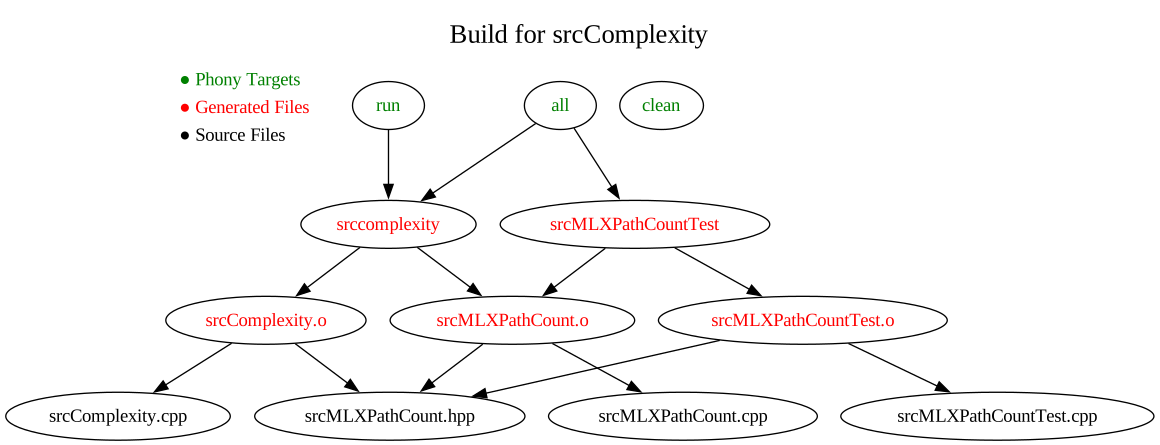
Upload a photo or image of the diagram to Brightspace by the end of class. Each member must upload their own, individual diagram.
- Include every file involved in the build: source files (
-
Week 6 Class 12 Thu Oct 01 Posted: Oct 01
After Class
- Office Hours today from 2:30 - 3:30 pm are cancelled.
Before Class
-
If you haven't already created the GitHub Classroom repository for "Build Files" you should do so before class. You can also set up a GitHub Codespace for the project, as it takes some time to start up initially and when restarting.
-
Exercise 25: Build Tools Background
Please complete before class starts. There are no wrong answers, and not much to write.
Announcements
-
Project 1 I will allow you to earn some points back by correcting what you submitted. To count:
- Each item in the feedback must be in a separate commit
- Each commit message must follow the guidelines we went over: 1) Start with an action, 2) Imperative form, 3) Use the one-line form, 4) Do not end in a period, and 5) Keep it a reasonable length.
- If an error was made, then create an issue at GitHub in your repository
- Due at 4 pm on Friday, Oct 2
- Project 2: Iteration Plan
- Post Page The main course page is getting quite long. A reminder that the title of each post is a link to a separate page of that post.
- Version Control We have only covered a high-level view of version control. During the rest of the semester, we will cover it in much more detail as part of dedicated notes and the overall workflow.
Class
- Notes: Version Control
- Exercise 23: Version Control Overview Crossword II Due by 4 pm on Fri Oct 2
- HFSD 6.5
-
Make
Build Files GitHub Organization Invitation Link - Create your own repository for this example (and future exercisese)
- GNU Make
- Make Rule Introduction What a rule looks like
- Special Note: recipes are indented using a tab character, not spaces. Using spaces (or an editor that expands tabs to spaces) will result in an invalid Makefile.
- Automatic Variables including
$@,$<, and$^ - NMake Microsoft's version of Make
- srcML Playground Generate new srcML of source code, input format for
srccomplexity
build-files-f26-010 Example I will demonstrate with
-
Exercise 26: Makefile
Code along and make the same commits with the same commit messages as I do in class.
I suggest you use GitHub Codespaces as all necessary packages are installed.
Remember that you can access my commits as I make them.
- Exercise 27: HFSD Chapter 6.5 Crossword
- Exercise 28: Team Iteration II
Unless stated otherwise, all exercises are due by 4 pm on Mon Oct 05
-
Project 2: Iteration Plan Posted: Oct 01
Project 2 is due on Friday, Oct 9 at 11:59:59 pm. The GitHub Organization Project 2 Invitation.
For Project 2, take all the user stories from Project 1 and create a series of iteration plans.
Use the examples in the book to show which parts of the user story you should show in your iteration plan (e.g., do not restate descriptions in the plans). Also, clearly state the entire new iteration plan for each plan, not just the changes. However, make sure to thoroughly discuss what the change was and what effect it had.
This is an individual project. Each member of a team has different user-story priorities. To get individual priorities for Project 2, select the number of user stories:
Put these in the Priority field in the order in which you listed the user stories. In the report, do not discuss how you generated your report's priorities, i.e., pretend that the customer gave them.
The following plans may require you to add additional user stories. This violates our rule that only the development team can create estimates. However, as part of the exercise, put in an estimate.
Each plan is a point in time. For each plan, show the entire iteration plan, including the iterations already completed.
Plan Events 1 Create an initial iteration plan: 2 Weeks (14 calendar days) iteration, 2 developers, 0.6 velocity 2 The customer adds two new user stories of the highest priority at the end of the first iteration. For the two new user stories, one is a new feature, and one is an emergency. Create a non-trivial estimate (i.e., an estimate that makes the planning interesting) for these new user stories. 3 A user story with a non-trivial estimate takes twice as long. Assume this occurred right before the last iteration. 4 At the beginning of the last iteration of your current plan, the other developer leaves for another project, and it is up to you to finish the project. After the plans, create a section with all of your user stories, including their titles, descriptions, estimates, and priorities. You will need estimates for all of your user stories.
-
Exercise 28: Team Iteration II Posted: Oct 01
Your team completed the first iteration. Despite inexperience with determining estimates, you did complete the all the planned user stories.
For some of the remaining user stories, not part of the first iteration, the customer updated the priorities of 4 user stories. Get new priorities for these user stories:
Now, design a second iteration. Use the principles in the book to decide which of the remaining user stories belong in the second iteration.
Individually, each team member will turn in to Brightspace notes with the following:
- Details of the calculation of the capacity of the iteration, i.e., how many days of work can be accomplished
- Set of user stories in the revised first iteration with title, estimate, and priority
- Set of user stories in the second iteration with title, estimate, and priority
- Any observations
Do not assume any dependencies between user stories.
The notes are due by the end of class. They can be a PDF (print to file from a computing device) or a JPG (picture taken via phone).
If you finish early, work on real estimates for your user stories.
-
Week 6 Class 11 Tue Sep 29 Posted: Sep 29
After Class
-
Exercise 25: Build Tools Background
Please complete before class starts. There are no wrong answers, and not much to write.
-
If you haven't already created the GitHub Classroom repository for "Build Files" you should do so before class. You can also set up a GitHub Codespace for the project, as it takes some time to start up initially and when restarting.
Announcements
-
- Scores are in Brightspace
- Feedback is in the branch feedback in the file Feedback.md. I suggest you view it on GitHub.
- Not all the items marked off caused you to lost points. But many did.
I will allow you to earn some points back by correcting what you submitted. To count:
- Each item in the feedback must be in a separate commit
- Each commit message must follow the guidelines we went over: 1) Start with an action, 2) Imperative form, 3) Use the one-line form, 4) Do not end in a period, and 5) Keep it a reasonable length.
- If an error was made, then create an issue at GitHub in your repository
- Due at 4 pm on Friday, Oct 2
-
Project 1 Observations
- Not being careful enough
- Not doing enough iterations
- Much inconsistency of the report and what is on the user story cards. This is a major error.
- Not enough time spent on the general process for estimation. Missing the term "planning poker", not giving the card values, not stating what the process is for forming a consensus, etc.
-
UNIX Commands
I occasionally use UNIX commands in a bash shell to perform development tasks or to point out the results of development tasks. Obviously there is
git, but there are a lot of other commands that we use. We just sawdiffandpatch.I recommend that you keep a list of these commands with the name, short description, and example of using it. These commands will not be on any exam unless I specifically say they are. However, they may be part of a crossword.
Class
-
Demo: Patching Linux
-
Exercise 22: Patching Linux
Follow along with the Patching Linux demo shown in class. Write the commands in order as they are applied in the demo.
For the URLs, copy and paste, or write a shortened form of the URL.
Upload to Brightspace this list of commands. This can be a text file, or an image of the commands written on paper. This is due by the end of class.
- Notes: Version Control
- Exercise 23: Version Control Overview Crossword II Due by 4 pm on Fri Oct 2
- HFSD Chapter 6.5
-
Make
Build Files GitHub Organization Invitation Link - Create your own repository for this example (and future exercisese)
- GNU Make
- Make Rule Introduction What a rule looks like
- Special Note: recipes are indented using a tab character, not spaces. Using spaces (or an editor that expands tabs to spaces) will result in an invalid Makefile.
- Automatic Variables including
$@,$<, and$^ - NMake Microsoft's version of Make
- srcML Playground Generate new srcML of source code, input format for
srccomplexity
build-files-f26-010 Example I will demonstrate with
- Exercise 24: Team Iteration
Unless stated otherwise, all exercises are due by 4 pm on Wed Sep 30
-
-
Exercise 24: Team Iteration Posted: Sep 29
As a team, create the first iteration of an iteration plan.
Ideally, we would have enough Team Meeting time to estimate all user stories using Planning Poker. However, we do not. To make up for this, I am providing estimates for the rest of your user stories. Enter the following:
Add these estimates to your user story cards.
The other missing item is the priorities. These come from the customer. To get priorities, select the number of user stories:
Add these priorities to your user stories.
You have 1 developer and a one-month iteration with a 70% velocity.
Use the principles in the book to decide which user stories belong in the first iteration.
Individually, each team member will turn in to Brightspace notes with the following:
- Details of the calculation of the capacity of the iteration, i.e., how many days of work can be accomplished
- Set of user stories in the first iteration with title, estimate, and priority
- Any observations
Do not assume any dependencies between user stories.
The notes are due by the end of class. They can be a PDF (print to file from a computing device) or a JPG (picture taken via phone).
If you finish early, use planning poker for estimates on the user stories your team did not estimate earlier.
-
Week 5 Class 10 Thu Sep 24 Posted: Sep 24
Announcements:
-
Tasks
- Tasks do not have names as titles. They are numbered.
- Tasks have a (numbered) title, a description, and an estimate. It is essential in software engineering to use proper terminology as much as possible.
- Only estimates obtained by a team consensus using a planning poker process will be put on tasks (just like with user stories).
- Tasks are not the process a user would go through. They are what the developer would go through. They are different parts of the implementation of the code.
- Tasks should be brief. For one thing, they need to fit on a post-it note. Secondly, that extra detail does not help; you would never have enough detail.
Class
- HFSD Chapter 6
- Notes: Version Control
-
Exercise 21:
diffandpatchWrite on paper the
diffandpatchcommands of the two sessions, Creation and Application on a piece of paper as I show this in class.Due after I show it in class.
- Exercise 19: Version Control Overview 1 Crossword Due by 4 pm on Wed Sep 30
- Exercise 20: Team Tasks II
Unless stated otherwise, all exercises are due by 4 pm on Fri Sep 25
-
-
Exercise 20: Team Tasks II Posted: Sep 24
As a team, take a user story that has an estimate, and create the tasks for that user story. Then, create the estimate for each task by playing planning poker using the procedure described on pages 48-49 of the book. Go through the estimation process at least one time.
When the team reaches a consensus for the estimate, place the estimate at the bottom of the task, e.g., "Estimate: 1 day" or "Estimate: 3 days".
Individually, each team member will turn in to Brightspace individual notes that include for each round of planning poker:
- Title of the user story, task title, and description of the task
- Any questions on or confusions with the user story/task
- Any assumptions that you made
- Any interesting assumptions that other team members made
- The spread of estimates, indicating which one is yours
- The final estimate, which is a team consensus (if the team was able to reach one in this round)
If the team cannot reach a consensus, table that task and go on to another one.
The notes are due by the end of class. They can be a PDF (print to file from a computing device) or a JPG (picture taken via phone). The notes are for today only. Do not start with the notes from the previous team meeting.
The more you work with the user stories, the more you will find improvements to them. Be sure to make those improvements.
-
Week 5 Class 9 Tue Sep 22 Posted: Sep 22
Announcements:
- Project 1
The screencast for using asciinema is for an old version. I will demonstrate in class on Tuesday how to run it. The due date for the URL of the asciinema session is extended to 11:59:59 pm on Tuesday, Sep 22. The due date for the project commits to GitHub stays the same.I am going to not require this for Project 1. More details later.
Class
- HFSD Chapter 4
- Exercise 17: HFSD Chapter 4 Crossword
- HFSD Chapter 5
- Exercise 18: Team Tasks
Unless stated otherwise, all exercises are due by 4 pm on Wed Sep 23
- Project 1
-
Exercise 18: Team Tasks Posted: Sep 22
As a team, take a user story that has an estimate, and create the tasks for that user story. Then, create the estimate for each task by playing planning poker using the procedure described on pages 48-49 of the book. Go through the estimation process at least one time.
When the team reaches a consensus for the estimate, place the estimate at the bottom of the task, e.g., "Estimate: 1 day" or "Estimate: 3 days".
Individually, each team member will turn in to Brightspace individual notes that include for each round of planning poker:
- Title of the user story and task
- Any questions on or confusions with the user story/task
- Any assumptions that you made
- Any interesting assumptions that other team members made
- The spread of estimates, indicating which one is yours
- The estimate, which is a team consensus (if the team was able to reach one in this round)
If the team cannot reach a consensus, table that task and go on to another one.
The notes are due by the end of class. They can be a PDF (print to file from a computing device) or a JPG (picture taken via phone). The notes are for today only. Do not start with the notes from the previous team meeting.
The more you work with the user stories, the more you will find improvements to them. Be sure to make those improvements.
-
Week 4 Class 8 Thu Sep 17 Posted: Sep 17
After Class
- Project 1 The screencast for using asciinema is for an old version. I will demonstrate in class on Tuesday how to run it. The due date for the URL of the asciinema session is extended to 11:59:59 pm on Tuesday, Sep 22. The due date for the project commits to GitHub stays the same.
Announcements
-
Exercise 13: Commit to Project 1 Repository
-
Project 1: Requirements Report
- Include all user stories, even those without estimates. If a user story does not have an estimate, leave the estimate value blank.
- Project 1 is not a team project. They only thing that you share with your team is the user story cards. Everything else originates from you. Do not set a team template for this.
- This is a report about the team results and process, not your individual results and process.
- The first two sections will be shown to the customer. Those sections should only contain information the customer is allowed to see. You will lose a significant number of points if you do not follow this rule.
- All user stories belong to the team. This is a report of the current state of your team project.
- There is no "my user story". All user stories belong to the team, actually the customer.
- The customer is not interested in tasks, only the user stories.
- The report should be readable and consistent both in markdown and displayed as a web page at GitHub.
-
Project 1 asciinema session The asciinema session is after you complete Project 1. Since you are still performing estimation, you are not done with the user stories for Project 1.
-
Estimates
- Estimation in software development is not about finding the minimum time it would take you to complete a user story. It's about understanding and predicting the genuine effort required in the context of a 5-day week 50 weeks a year. Remember, an estimate is not a speed challenge but rather a measure of how long it will realistically take to completely implement a user story.
- Avoid the trap of only considering the quickest or simplest implementation. Proper estimation requires thoughtful consideration of all possible complexities. Moreover, completing a user story quickly doesn't mean the rest of the day is free; there's always another user story waiting. This is not a class assignment or a lab exercise where once you are finished you are done for the day.
- Refrain from using phrases like "All we have to do …” when discussing software tasks. Such assumptions oversimplify the complexities of coding.
Class
- HFSD Chapter 3
- Exercise 14: HFSD Chapter 3 Crossword
- HFSD Chapter 4
- Exercise 16: Team User Story Estimates II
Unless stated otherwise, all exercises are due by 4 pm on Fri Sep 18
-
Exercise 16: Team User Story Estimates II Posted: Sep 17
Start by reviewing your user stories, particularly the titles. Titles that do not have an action term, or have a poor action term, will reduce your score on Project 1.
As a team, create estimates for the user stories by using the planning poker procedure described on pages 48-49 of the book.
When the team reaches a consensus for the estimate, place the estimate at the bottom left of the User Story as indicated by the example, e.g., "Estimate: 1 day" or "Estimate: 3 days".
Individually, each team member will turn in to Brightspace individual notes that include for each round of planning poker:
- Title of the user story
- Any questions on or confusions with the user story
- Any assumptions that you made
- Any interesting assumptions that other team members made
- The spread of estimates, indicating which one is yours. Be very careful with this, and note that a spread is on a number line.
- The estimate, which is a team consensus (if the team was able to reach one in this round)
If the team is not able to come to a consensus, table that User Story and go on to another one.
The notes are due by the end of class. They can be in the form of a PDF (print to file from a computing device), or a JPG (picture taken via your phone).
The more you work with the user stories, the more you will find improvements to them. Be sure to make those improvements. Also, you may think of additional user stories. Be sure to add them.
-
Week 4 Class 7 Tue Sep 15 Posted: Sep 15
Announcements:
-
Exercise 11: GitHub Username
There are three steps to allow you to create repositories for the projects and some of the exercises:
- You provide your GitHub username
- I add you to the roster of the course in Classroom 50 (already completed for those who provided their GitHub username)
- GitHub sends you an invitation to become a member of the UACPSC organization, and you accept it.
For 3, I indicated in your feedback for Exercise 11 if this was not accepted yet, then you need to accept the invitation
Invitations are email to the email account for your GitHub Username. I assume in most cases this is your UA email.
You can also view these on your GitHub Organization Page
If you accept the invitation, I will give you full credit for this exercise.
-
Windows File Explorer & WSL
To open the Windows File Explorer on the current directory in WSL:
The
.means the current directory in WSL. You can also open a fileexplorer.exe Requirements.md. If you open a path it has to be in Linux format, e.g., C:\Users\JohnDoe\Documents would be /mnt/c/Users/JohnDoe/Documents. -
Assumptions
I noticed that many of the assumptions mentioned are about the difficulty of implementation. This is not what the book discusses. Instead, they are assumptions about what the user story means. The only person who can answer those assumptions is the customer.
From now on, label assumptions about the user story as assumptions and assumptions about implementation as implementation.
-
Dependencies
I see a lot of user story estimates where the assumptions include the completion of a previous user story. This is a dependency. Avoid dependencies at all costs. For example, Add … does not have to be completed before Delete …. Obviously there will be some dependencies, but they are to be at the user-story level, not the implementation level.
Class
- GitHub Codespaces
- GitHub Authentication
- Creating the Report
- Git Commands The table will expand as we use more commands
-
Exercise 13: Commit to Project 1 Repository
Following the procedure given in the assignment and demonstrated in class, contribute at least one commit to the Project 1 repository. This must be a valid and useful commit.
- Use the
gitCLI to make the commit. You can do this wherever you have the repository cloned. You can even do this in a GitHub Codespace - Good commit messages follow certain patterns, and you need to follow them on all
gitcommits:- Start with an action, e.g., Add
- Capitalize the subject line (the only line we are using)
- Use the imperative mood, e.g.,
Added,Adding,Adds, Add - Do not end the subject line with a period
You can see your commit messages with the
git logcommand. - Use the
- HFSD Chapter 3
- Exercise 14: HFSD Chapter 3 Crossword Due by 4 pm on Friday, September 18
- HFSD Chapter 4
- Exercise 15: Team User Stories III
Unless stated otherwise, all exercises are due by 4 pm on Wed Sep 16
-
-
Exercise 15: Team User Stories III Posted: Sep 15
Your management is concerned that your team does not have a complete set of user stories. The first problem is low recall, i.e., the team is not capturing all the user stories the customer needs. The second problem is that without not enough work, the organization will have to
let some of the team members gocut everybody's pay.The customer met with their team and returned with a list of potential user-story titles. These possible new user stories fall into one of the following categories:
- An existing user story
- Not a user story title
- New, but needs to be converted from plural to singular
- New, but needs to be split into multiple stories
- Not part of the description
Each team member will fill out the form for your team. The form will not be available until your team meeting time.
Create a new user story, or multiple user stories, for each of these valid potential user stories. This includes fixing any title issues and adding a description. Also, take this time to fix any existing user stories.
If you have any additional time, then create more estimates. As you did before, keep track of details for the next team meeting when you will submit any estimate details.
There is nothing to upload for this exercise. Complete the provided form during class time.
-
Week 3 Class 6 Thu Sep 10 Posted: Sep 10
After Class
-
Exercise 11: GitHub Username
There are three steps to allow you to create repositories for the projects and some of the exercises:
- You provide your GitHub username
- I add you to the roster of the course in Classroom 50 (already completed for those who provided their GitHub username)
- GitHub sends you an invitation to become a member of the UACPSC organization, and you accept it.
For 3, I indicated in your feedback for Exercise 11 if this was not accepted yet, then you need to accept the invitation
Invitations are email to the email account for your GitHub Username. I assume in most cases this is your UA email.
You can also view these on your GitHub Organization Page
If you accept the invitation, I will give you full credit for this exercise.
-
Note that the link (in the title of this this notice) will only work if you:
- Provided me with your GitHub username (Exercise 11)
- I entered you into the roster
- You are a member of the UACPSC GitHub Organization (you accepted the invitation)
Announcements:
-
Similar Action Words
Many action words are similar in meaning, but can vary in specificity or in details that they imply.
Word 1 Word 2 Explanation Delete Remove "Delete" often implies a permanent action, while "Remove" can be less final or reversible Approve Accept "Approve" sounds authoritative, while "Accept" is more general Invite Connect "Invite" is very specific, suggesting a request for participation, whereas "Connect" is broader Create Add "Create" is making something new, whereas "Add" can mean including something that already exists Subscribe Register "Subscribe" is ongoing engagement, while "Register" is often a one-time action Approve Validate "Approve" is a decision or permission, while "Validate" suggests checking or confirming correctness Merge Link "Merge" is combining into one, whereas "Link" connects them without combining Submit Send "Submit" is submission to a process, while "Send" is transferring information Stop Pause "Stop" is final, while "Pause" is temporary Cancel Stop "Cancel" is preventing something from starting or finishing, whereas "Stop" is halting an ongoing action Note that the customer may not realize the difference between these terms, and say one when they mean the other.
-
Exercise 11: GitHub Username GitHub Classroom is no more. Instead, we are using Classroom 50. The process for allowing you to create a repository has changed and is as follows: 1) Add you to the UACPSC GitHub Organization, and 2) Add you to the roster for the course. To do so, I need your GitHub Username. If you don't provide it, you won't be able to do the projects and some exercises.
The title of this exercise is a link to the form where you can enter your GitHub Username.
Once I add you to the roster, you will receive an invitation to join the UACPSC GitHub Organization. You will need to join in order to create repositories. Note that this differs from the GitHub Classroom process of the past.
Due Friday, Sep 11 by 9 am.
Class
Unless stated otherwise, all exercises are due by 4 pm on Fri Sep 11
-
-
Project 1: Requirements Report Posted: Sep 10
Project 1 is due Monday, September 21 at 11:59:59 pm, in the file Requirements.md in a GitHub Organization UACPSC repository. You will need a GitHub account, give me your GitHub Username, and accept the invitation to join the GitHub organization UACPSC. Once you are all setup, an invitation link to create the repository is in Brightspace.
Description
At your place of work, you need to submit a formal report describing the project's current state. Write a report of your individual and team activities, including these primary sections:
1. User Stories
User Stories with title, description, estimate, and space for priority
This will be shown to the customer. This section should not contain any information that a customer should not see.
2. General Process
Details of the overall process and procedure that created the Estimates
This will be shown to the customer, so only data on the User Story cards from section 1 should be shown.
3. Background Data
Details on spread, assumptions, issues, etc.
How did the team interaction work, and what did and did not work well
This will not be shown to the customer. It is for your supervisor.
In other words, the report describes all the work and processes followed while creating the user stories and their estimates. The details of the general process and the general observations in Section 3 are in the form of a narrative, i.e., describe what you did, how you did it, and the result, ordered by time. The report's tone is professional, with a clear, consistent presentation.
The team created the User Stories and Estimates, but this report is an individual project. In your account, make changes to User Stories if they do not follow the guidelines given in the book. These changes are especially crucial for the Title and the Description. Split User Stories if the Estimate is too large. Explain any changes in your report.
Content Notes
- Identify yourself clearly at the top of the page with your name, email, team name, and section
- Do not address me at the top of the page
- Do not sign it at the bottom
Format
The report uses plain-text formatting syntax Markdown. Markdown is an almost universal format for text formatting in software development. Due to its direct conversion to HTML, Markdown has replaced HTML and other plain-text formatting languages in SE. It has become so popular that it is a new document type in OneDrive.
- While Markdown does allow using HTML, do not use any HTML in this report
- The entire report must be in a single, self-contained file: Requirements.md
- The report is to look good both as raw Markdown and as a web page in GitHub
- Plain text (no .pdf, .doc, .docx, etc.)
- UTF–8 encoding, Note: An ASCII document is a UTF–8 document
- The file, like all text and source-code files, should end in a newline
- Do not use any unnecessary multiple-blank lines
Creating the Report
You will use
gitto work on your report. Assuming a username ofjdoe@uakron.edu, the steps are as follows:- Create your project repository using the link in Brightspace
- Copy the URL from your project page
- Clone your repository, e.g.,
jdoe@uakron.edu - Move to your repository directory:
- Edit your document. Any text editor will do. E.g., add the title.
- Commit your change with a reason for your change: Commit messages start with a verb, e.g., Add, Remove, Change, Fix, Reformat, etc. Follow the style given in this example: Capitalized verb, no period.
- View your current commits:
- Push your commits to GitHub:
- Verify that your changes appear in GitHub
- Repeat steps 5-9 for each change.
Note: All commits must have non-blank commit messages. Any non-blank commit messages will not be accepted, leading to a 0 on the entire project.
GitHub Codespace
A GitHub Codespace is available for this project. See the guide GitHub Codespaces.
Final Check
After you have committed your final change to the project, you must run your report through a report check to see if it follows many of the Markdown requirements of the project. To do so, create a GitHub Codespace for the project. When in there, enter the command:
You should see a clean report. If it finds anything, fix it and rerun the
checkmdcommand.The
checkmdis a custom command created for this project to verify specific Markdown requirements. A clean run does not mean you have nothing wrong with your project.Final Submission Requirement
Upload an terminal session of your report successfully passing the
checkmdprogram.To demonstrate this, you will record a terminal session using asciinema. It records the commands you enter and the output the command produces.
asciinemais already installed in the GitHub Codespaces image. You can also install asciinema on Linux/WSL/macOS.asciinemais relatively straightforward to use.Further Note I am removing the screencast requirement for Project 1
Note I removed the example screencast because it is for an old version of asciinema.
Go to the asciinema site, or wait until Tuesday, Sep 22 when I will demonstrate it in class.The screencast URL due date is extended to 11:59:59 pm on Tuesday, Sep 22. The project due date remains the same.You can play, pause, skip, etc. You can also copy the commands as text. Note that the replay even includes your pauses and any delay as the command is run.
At the end of the terminal session,
asciinemawill show a URL. Anybody can use this URL to view the session. This is what you will submit for the exercise to the link in the exercise title. The URL should not contain "connect" or be a local file. Test your URL in a browser; an incorrect URL will receive a 0.Submit the URL via this form: Project 1
Score
The report content, format, and involvement in team activities are all considered for your score.
Think carefully about how you present the report, including using Markdown. Remember, the User Stories form an unordered set, not an ordered list.
-
Exercise 12: Team User Story Estimates Posted: Sep 10
Start by reviewing your user stories, particularly the titles. Titles that do not have an action term, or have a poor action term, will be counted off on your score for this exercise.
As a team, create estimates for the user stories by using the planning poker procedure described on pages 48-49 of the book.
When the team reaches a consensus for the estimate, place the estimate at the bottom left of the User Story as indicated by the example, e.g., "Estimate: 1 day" or "Estimate: 3 days".
Individually, each team member will turn in to Brightspace individual notes that include for each round of planning poker:
- Title of the user story
- Any questions on or confusions with the user story
- Any assumptions that you made
- Any interesting assumptions that other team members made
- The spread of estimates, indicating which one is yours. Be very careful with this, and note that a spread is on a number line.
- The estimate, which is a team consensus (if the team was able to reach one in this round)
If the team is not able to come to a consensus, table that User Story and go on to another one.
The notes are due by the end of class. They can be in the form of a PDF (print to file from a computing device), or a JPG (picture taken via your phone).
The more you work with the user stories, the more you will find improvements to them. Be sure to make those improvements. Also, you may think of additional user stories. Be sure to add them.
-
Week 3 Class 5 Tue Sep 08 Posted: Sep 08
After Class
-
Exercise 11: GitHub Username GitHub Classroom is no more. Instead, we are using Classroom 50. The process for allowing you to create a repository has changed and is as follows: 1) Add you to the UACPSC GitHub Organization, and 2) Add you to the roster for the course. To do so, I need your GitHub Username. If you don't provide it, you won't be able to do the projects and some exercises.
The title of this exercise is a link to the form where you can enter your GitHub Username.
I am posting this early since the deadline is earlier than normal. Due Friday, Sep 11 by 9 am.
Announcements:
- Team Exercises & Feedback Each team member gets individual feedback on the team exercises. This includes the work the team did as a whole, as well as your individual contributions. Feedback from the previous team exercise often relates to the current team exercise. Therefore, I am requiring you to view your feedback from the last team exercise via the Assignments page. Failure to do so will result in a large penalty to your exercise score. I suggest that the team remind each other about this at the start of the team meeting.
- Guide: User Story Title Candidates Feedback
-
Action-Oriented Titles
The primary goal of user stories is to capture a specific need or goal of a user in the context of software development. It's about "what the user wants to do" or "achieve" with the software.
Benefits of Action-Oriented Titles:
- Clarity Action-oriented titles make it clear what the expected outcome or behavior of the system should be
- Focus on Value Emphasizing actions reminds the team to focus on delivering value and functionality rather than just creating artifacts
- Facilitates Testing It is easier to derive test cases from action-oriented stories
-
User Story Titles and the Number Grammatical Category
Strongly consider using a title with a singular noun for a user story, instead of a title with a plural noun, because it emphasizes the atomic nature of the action.
Plural Singular Upload Documents Upload a Document Send Messages Send a Message Add Products to Cart Add a Product to the Cart Register for Events Register for an Event View Notifications View a Notification Search for Jobs Search for a Job In general, user stories with singular titles are going to be easier to implement. There can be exceptions, as "View Notifications" may be simpler than "View a Notification" due to not having to select just one.
The most important aspect is clarity and understanding. If "Purchase Clothes" effectively communicates the intent without ambiguity and your team finds it more natural, it's also acceptable. The choice between singular and plural should ultimately be guided by what best serves the clarity and focus of the story in your context.
- Development Environment: Git Setup by next class.
Class
- HFSD Chapter 2
- Exercise 9: HFSD Chapter 2 Crossword
- HFSD Chapter 3
- Exercise 10: Team User Stories II
Unless stated otherwise, all exercises are due by 4 pm on Wed Sep 09
-
-
Exercise 10: Team User Stories II Posted: Sep 08
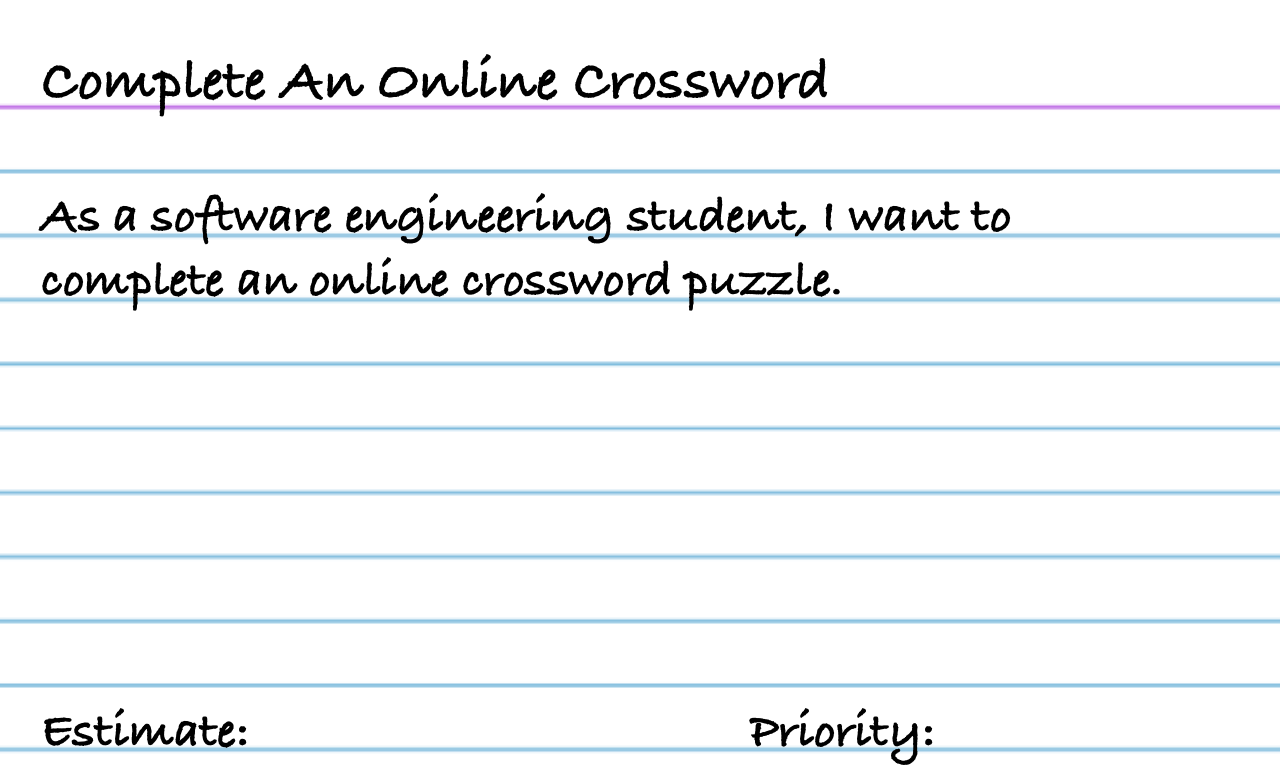
Your team is to correct the current user stories and increase the number of user stories. Very carefully go over your user titles and descriptions. Add more user stories and see what you are missing.
The number of user stories per teams was 7, 9, 11, 12, 16, 16, 16, 17, and 27(!). Twelve and under are far too few. Greatly increase the number.
Remember to split any user stories that you can. Apply the "and" rule.
- I want a lot of user stories. Do not make any judgments on whether they are worthwhile or not. Generate as many as you can
- The User Stories do not belong to an individual team member. They belong to the team. So feel free to make changes to stories, even if you are not the original author.
- For this assignment, no User Story should have a title that includes "Login" or similar terms. Assume that they have already logged in or (much better) do not have to log in.
- You have not performed an estimation process. Do not fill in the estimate with some guess or random number.
In addition to the team work of extracting user stories from the app description, each team member will turn in to Brightspace individual notes that includes:
- The total number of user stories
- The titles of at least five user stories. Just state them. No order required.
The individual notes are due by the end of class uploaded to Brightspace. They can be in the form of a PDF (print to file from a computing device), or a JPG (picture taken via your phone).
Do not upload a photo of all your user stories This will result in a very low score for the exercise. Follow the directions for the individual notes.
-
Week 2 Class 4 Thu Sep 03 Posted: Sep 03
Announcements:
- Exercise 3: App Idea The feedback on Tuesday for this exercise included "If you fail to fix your issues or view your feedback by 3 pm on Wed Sep 02 I will change your score to a 0". Viewing feedback on an assignment is part of the exercise and project process. If you did not fix your issues or view the feedback, I changed your score to a 0.
- Data Format Example ADA Title II → WCAG 2.1 AA (or better)
Class
- HFSD Chapter 2
-
Exercise 7: HFSD Chapter 2 p42 User Story Interview
- Be sure to save your response
- You cannot go back and edit your response
- The number correct is your score out of 10
-
- Note that almost all Team Exercises will have individual notes due by the end of class.
Unless stated otherwise, all exercises are due by 4 pm on Fri Sep 04
-
Exercise 8: Team User Stories Posted: Sep 03
Each Team is assigned a separate App with the description in Brightspace.
As a Team, create as many User Stories as you can for that app from the app description. For now, this is just the Title and the Description. The Title is just an action that a user can perform. The Description is from 1 to 3 sentences that describes what that action is. Follow the examples given in the book.
The User Stories are written on the provided index cards. I will provide a folder for you to put the cards in as I will collect the cards at the end of class.
- I want a lot of user stories. Do not make any judgments on whether they are worthwhile or not. Do not stop at 6 or some specific number. Generate as many unique user stories as you can.
- You do not "own" a user story. The user story is part of the project. If you leave the project, the user stories do not go with you.
- For any assignment in this class, no user story should have a title that includes "Login" or any similar terms. Assume that they have already logged in or (much better) do not have to log in.
In addition to the team work of extracting user stories from the app description, each team member will turn in to Brightspace separate, individual notes that include:
- The total number of user stories created
- The titles of at least 3 user stories
The individual notes are due by the end of class uploaded to Brightspace. They can be in the form of a PDF (print to file from a computing device), or a JPG (picture taken via your phone).
-
Week 2 Class 3 Tue Sep 01 Posted: Sep 01
Announcements:
-
Exercise 3: App Idea I posted scores and feedback in Brightspace
- "Do not identify yourself in the description"
- "Submit via Brightspace in PDF form" Word documents are not PDFs
View your feedback even if you got a 10 / 10. In some cases, a 10/10 does not mean there was nothing wrong.
Fix any issues that I identified.
If you fail to fix your issues or view your feedback by 4 pm on Wed Sep 02 I will change your score to a 0
Note: This "fix your issues and get full points" is not the norm for the exercises and assignments in the course
Class
- HFSD Chapter 1
-
Exercise 5: HFSD Chapter 1 Crossword
- Print using browser (not a screenshot). If a screenshot or a scan, you will receive a 0.
- Include a timestamp with Headers and Footers (Chrome: More settings/Options; Safari: Safari/Print headers and footers)
- HFSD Chapter 2
- Exercise 6: Teams
Unless stated otherwise, all exercises are due by 4 pm on Wed Sep 02
-
-
Exercise 6: Teams Posted: Sep 01
Form a team of 4 members. The final team composition is at the discretion of the instructor.
After forming a team, your team needs to decide on a name from the following choices:
- Three Stooges (Moe, Larry, Curly, Shemp, Curly Joe)
- Marx Brothers (Chico, Harpo, Groucho, Gummo, Zeppo)
- Star Wars Characters
Pick at least 4 names.
Send Dr. Collard and Mr. Cowan an email with the following:
- Subject is
CPSC480-010 Team - CC all members of the team using their UA email address
- An attachment file,
members.csv, in the CSV (Comma-Separated Values) format. Use the following as an example:
Firstname,Lastname,Email,Section,Team John,Doe,johndoe@uakron.edu,010,Harpo Jane,Doe,janedoe@uakron.edu,010,Harpo Brian,Doe,briandoe@uakron.edu,010,Harpo Suzy,Doe,suzydoe@uakron.edu,010,Harpo- The body of the email is a list of requested team names in priority order, e.g.,
Harpo
Moe
Yoda
Zeppo
The purpose of a team is not just to divide the work but also to meet a required level of quality. All members of the team must check any team assignment in this course. You, as a team, are responsible for these directions. Any emails sent as part of an assignment (including exercises) must have the correct subject, CC list, and contents. Exercises are not accepted and do not receive points if they do not have the proper form and content.
The exercise is due by the end of class.
-
Week 1 Class 2 Thu Aug 27 Posted: Aug 27
Announcements:
- Scores I posted the feedback and scores in Brightspace for Exercises 1 & 2
-
Syllabus Missed section on prerequisites.
Prerequisites: Minimum C- in CPSC 210 Computer Science II
Since the prerequisite course is in C++, we will also use C++.
- Survey Results
- Notes The class notes have a bunch of default and custom hotkeys. Type a "?" to see the help.
Class
- Notes: Context
-
Exercise 3: App Idea - Submit via Brightspace in PDF. Due by 4 pm on Mon Aug 31
All applications start with an idea or a need. As a user, write a description of an application. The description should include who would use it and its features. The application can be one that you create yourself or an existing program.
Guidelines:
- The description must be at least 350 words long
- Include a name for the app at the top
- Do not identify yourself in the description
- Assume this is a smartphone app
- The description should be of the what not the how. Do not include any discussion of programming languages, libraries to use, or software design. Do not talk about how easy or difficult it would be to create the app. Do not describe the screens, views, or user interaction.
- If the application already exists, be creative with your name and description
Comments:
- This is not the place if you have a great app idea. Your app idea may be shared with others or discussed (anonymously) with the entire class.
- This is not the app that you or your future team will work on.
- Notes: Roots
- HFSD: Chapter 1
- Exercise 4: HFSD Chapter 1 Sharpen Your Pencil Completed during class.
Unless stated otherwise, all exercises are due by 4 pm on Fri Aug 28
-
Week 1 Class 1 Tue Aug 25 Posted: Aug 25
Announcements
- Syllabus The syllabus is available via a link on the main page. It is via Simple Syllabus and you must be logged into UA to view the full contents. The course description does not reflect the last changes, and should be:
A comprehensive overview of all phases of software development, including requirements, analysis, design, implementation, testing and validation, release, maintenance, and evolution, focusing on agile methodologies.
- GitHub We use GitHub and GitHub Classroom in the class to manage documents and source code for projects, exercises, and examples. You are required to have a GitHub account. Optionally, you can apply for the Student Github Developer Pack and get a free GitHub Pro account. To apply, your account email can be a school account or a personal account if you upload documents to prove your current enrollment status.
- O'Reilly Online Learning The course textbooks are available in O'Reilly Online Learning. You do not have to be on the campus network (e.g., via VPN) to access O'Reilly Online Learning. To access, click the "Institution not listed?" link below the dropdown and enter your UA email. You will then create an account and use that account from now on. For more information: Library LibGuide
Exercises
- Exercise 1: SE Survey
-
Exercise 2: Software Development Diagram
Draw the Software Development Diagram that I present in class. Upload a PDF or JPG through Brightspace.
- For next class: Read Chapter 1 of the HFSD (Head First Software Development) book.
All exercises are due by 4 pm on Wed Aug 26
-
Welcome Posted: Aug 21
Greetings and welcome to CPSC 480 Software Engineering (SE) section 010 for Fall 2026.
- Survey The first exercise is to fill out the class survey. The survey is due after our first class meeting, but you can complete it before.
- Syllabus The syllabus is available via a link on the main page. It is via Simple Syllabus and you must be logged into UA to view the full contents. The course description does not reflect the last changes, and should be A comprehensive overview of all phases of software development, including requirements, analysis, design, implementation, testing and validation, release, maintenance, and evolution, focusing on agile methodologies.
- Textbook The course has two textbooks. We start with the Head First Software Development (HFSD), available from Safari Books Online via a link at the bottom of the main course page.
- GitHub In the class, we use GitHub and a GitHub Organization to manage documents and source code for projects and examples. You are required to have a GitHub account. The account email (not necessarily the account name) should be your @uakron.edu email address. If it is, you can apply for the Student Github Developer Pack and get a free GitHub Pro account.
See you on Tuesday, Aug 25 at 12:15 - 1:30 pm in Arts & Sciences (CAS) room 136