Week 6 Class 10 Thu Feb 19 Posted: Feb 19
Special Note The yuml.me site is experiencing problems. Due dates for class diagrams are extended. Other parts of tag deadlines are not extended.
Additional Special Note The yuml.me site is back up. I will be lenient on the class diagrams for Project 2, but get the Class Diagram exercise completed so I can give you feedback.
After Class
Announcements
v1e Issue: Code assumes unique attribute and value
The code that counts the number of line comments assumes that the comment element is the only element that has the
form: <... type="line">
While not verified, it is also probably the case that the code for counting the number of literal strings has the same limitation.
These elements do have these forms. But assuming this is true for all other srcML elements, current or future, is an assumption that is never stated or described. The choice is to describe in excruciating detail why this is the case, how someone could detect it, and what to do with their data when this happens. This requires forms that have to go to legal and be filled out in triplicate.
Another choice is to fix the problem.
I will not take points off for this issue. However, I expect it to be fixed:
XML Parsing Concerns && xml_parser.hpp XML parsing concerns belong in xml_parser.cpp. The role of xml_parser.hpp is not to support xml_parser.cpp, but to allow the use of the functions in xml_parser.cpp to be called by external code, e.g., srcfacts.cpp.
XML concepts belong in xml_parser.hpp. XML parsing details belong in xml_parser.cpp.
Doxygen Function/Method Comments In the Utilities assignment today, the given example is
The first line of text is the brief description. Note the blank line after it before the param. That is the style used by the Doxygen documentation, and many style guides. In fact, the @param part requires a blank line between it and the brief description.
Agenda
Exercise 34: Sequence Diagram II Based on my feedback, fix your sequence diagram from Exercise 33: Sequence Diagram
Use the same repository.
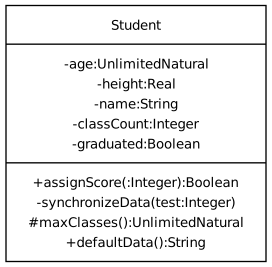
Exercise 37: Create a UML Class Diagram
Create a UML Class Diagram at yuml.me for the class diagram on the right.
Compose your class diagram at yuml.me. The resulting contents of the box on yuml.me will go into the file ClassDiagram.txt in the GitHub Classroom Repository (link in Brightspace). You should be able to copy the contents of the file ClassDiagram.txt and paste it into the editor at yuml.me and see the diagram on the right.
Your final result should look exactly like the image shown here. The style used for the image is Boring, instead of the default Scruffy or Plain.
Make sure to commit after each of the following parts:
Note that yuml.me can be temperamental. Add iteratively and carefully. Commit often, as you might find yourself breaking your previously working diagram.
Note Due date extended. Due by 3:30 pm on Wed Feb 25
Unless otherwise noted, exercises are due by 3:30 pm on Mon Feb 23